
COLUMN
04/11/2026
Self-Hosting an LLM API: Serving Open-Weight Models with vLLM on Kubernetes
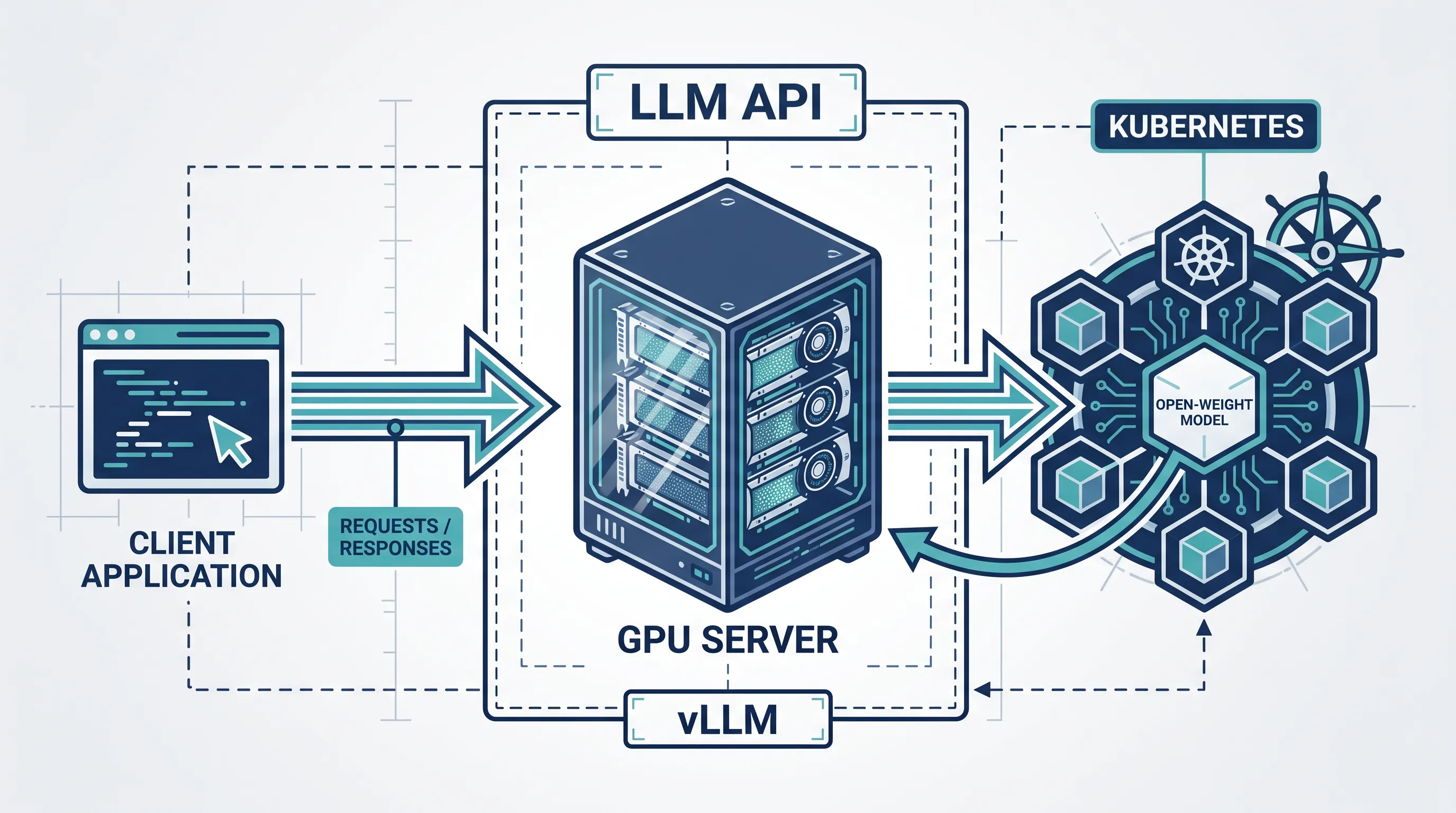
LLM apps outgrow a single vendor API faster than teams expect — this guide covers what it takes to run your own.
Most teams start with a hosted LLM API because it is the fastest way to ship. Then the bill grows, a compliance review flags where prompts and completions are sent, or a product needs a model the vendor doesn't offer. At that point, "self-hosting an LLM API" stops being a hobby project and becomes an infrastructure decision.
This guide walks through what it actually takes: picking a serving stack, exposing it as an API, and running it reliably on Kubernetes once a single GPU box isn't enough.
What "self-hosting an LLM API" actually means
Self-hosting here doesn't mean training a model. It means running an inference server — software that loads an open-weight model into GPU memory and answers requests — behind an API endpoint you control. Popular options include vLLM, Hugging Face's Text Generation Inference, and Ollama for lighter local workloads.
The trade-off is explicit: you take on GPU provisioning, scaling, and uptime in exchange for control over cost at volume, data residency, and which model you run.
Picking a serving stack: why vLLM
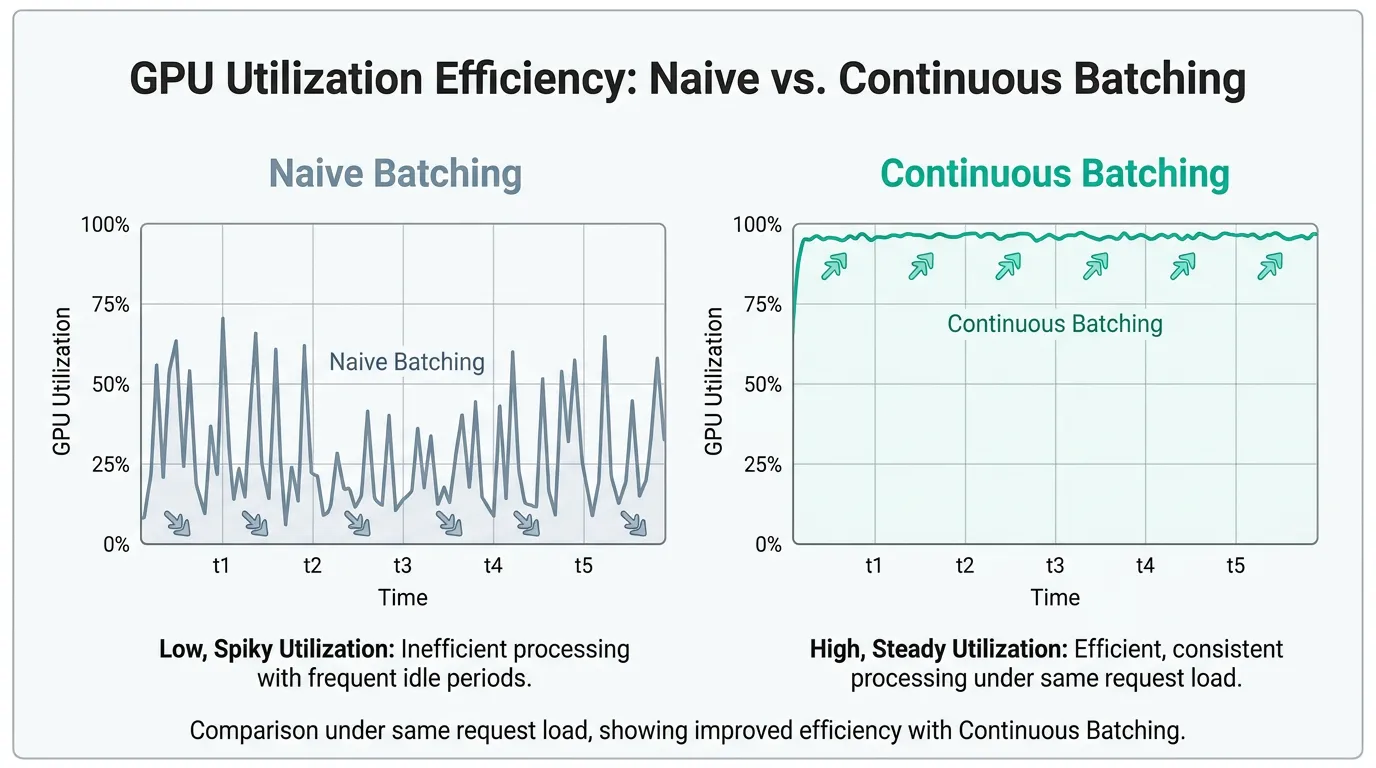
For production traffic, vLLM is the most common choice because of two techniques described in its PagedAttention paper: it manages the GPU memory used for attention key-value caches in fixed-size blocks instead of one contiguous allocation per request, and it batches new and in-flight requests continuously rather than waiting for a fixed batch to complete. Together, these raise GPU utilization significantly compared to naive batching, which is what makes self-hosting cost-competitive with per-token API pricing at meaningful volume.
vLLM also ships an OpenAI-compatible server out of the box, so existing client code written against openai's SDK can often point at your own endpoint with just a base URL change.
Picking a model size for your GPU budget
Model size is the first real constraint. A 7B-parameter model fits comfortably on a single 24GB GPU in half precision; a 70B model needs either multiple GPUs with tensor parallelism or a quantized format that trades a small amount of accuracy for a much smaller memory footprint. vLLM supports quantized formats including AWQ and GPTQ, which can roughly halve memory use compared to running the same model at FP16.
The practical approach is to size for your actual context length and concurrency needs rather than the largest model available: a well-tuned 7B or 13B model serving a narrow task often beats an oversized general model that spends half its GPU memory budget on a context window nobody uses.
Running vLLM in a container
A minimal vLLM server for an open-weight model looks like this:
docker run --runtime nvidia --gpus all \
  -v ~/.cache/huggingface:/root/.cache/huggingface \
  -p 8000:8000 \
  vllm/vllm-openai:latest \
  --model mistralai/Mistral-7B-Instruct-v0.3 \
  --tensor-parallel-size 1 \
  --gpu-memory-utilization 0.9 \
  --max-model-len 8192
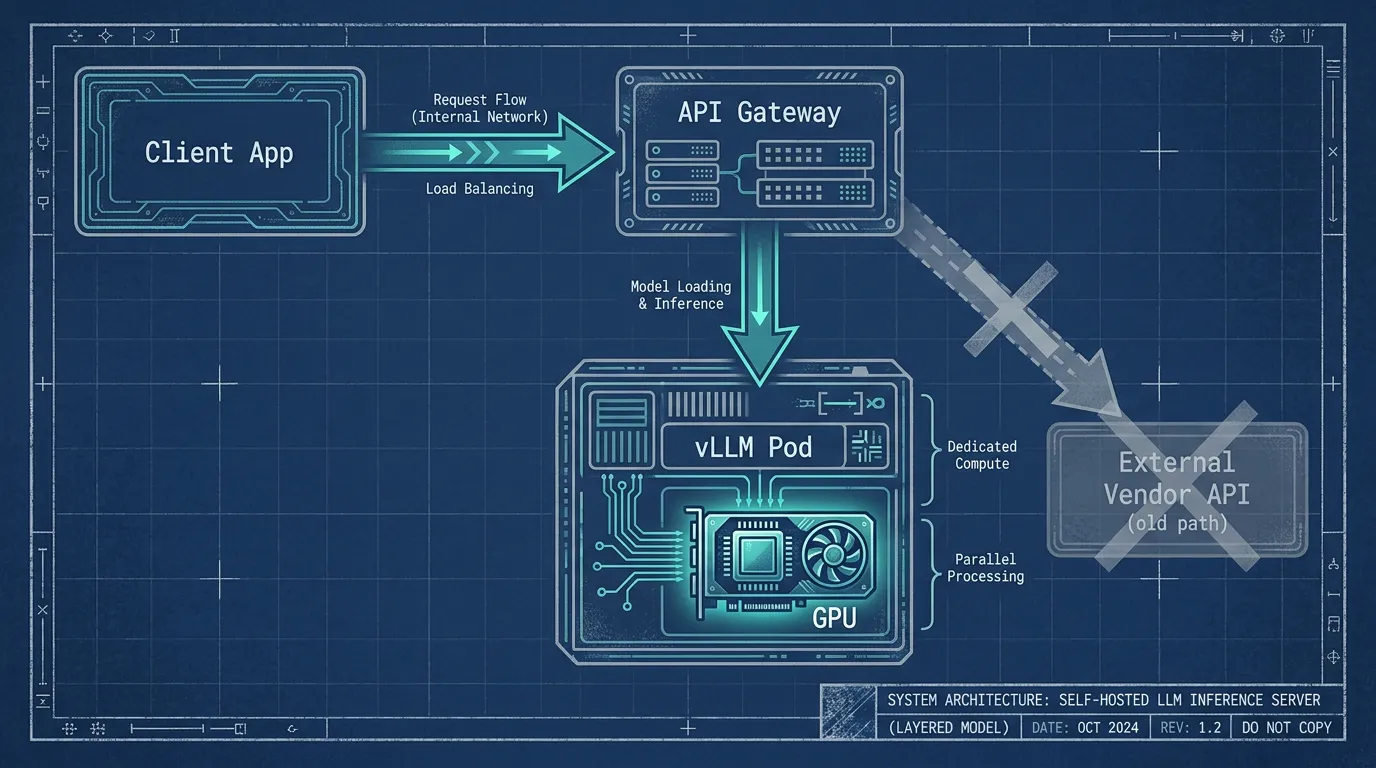
--tensor-parallel-size splits the model across multiple GPUs when one card isn't enough memory; --gpu-memory-utilization caps how much of the GPU's memory vLLM reserves for the KV cache versus leaving headroom for the OS and other processes. The server exposes /v1/chat/completions and /v1/completions, matching the OpenAI API shape.
Scheduling GPU workloads in Kubernetes
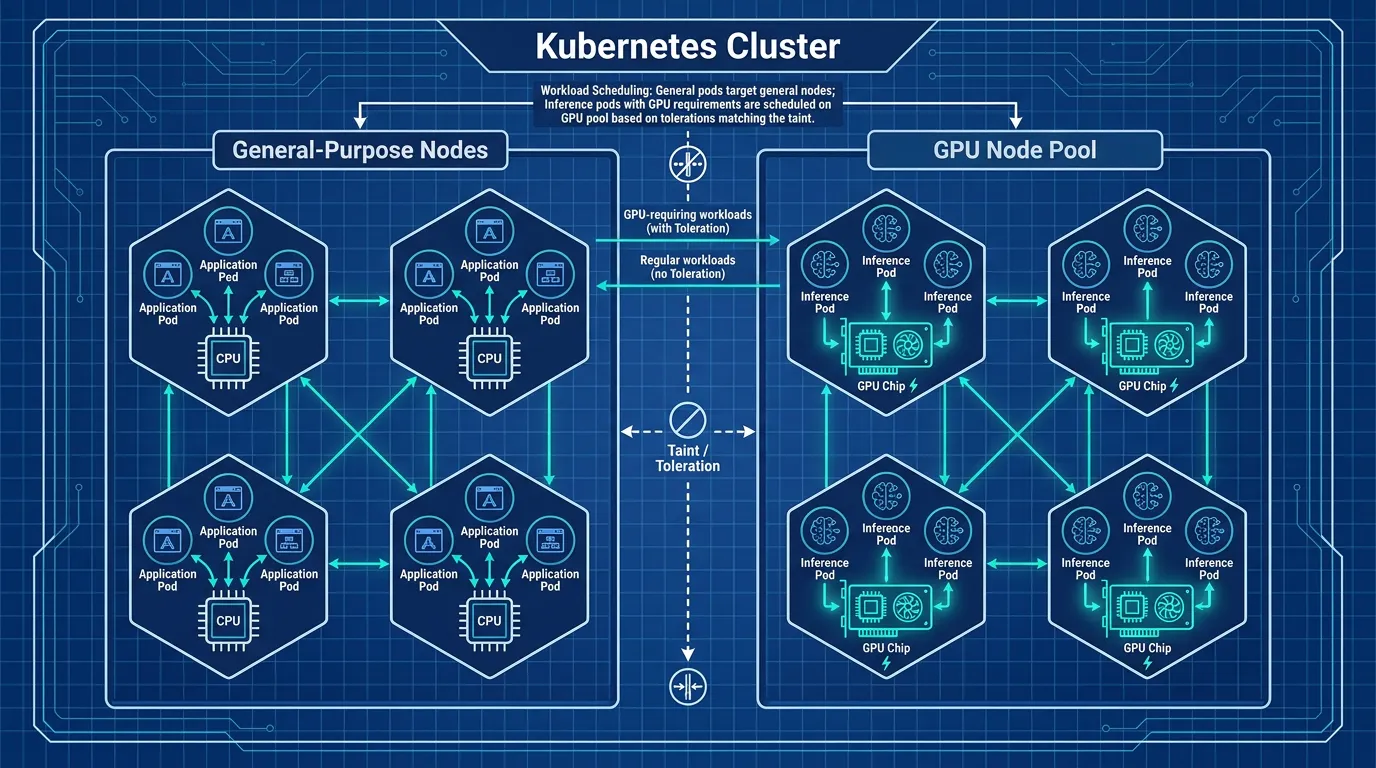
Running one container on one GPU box is simple. Running it reliably — with restarts, multiple models, and shared GPU capacity across teams — is what pushes teams toward Kubernetes. The NVIDIA device plugin for Kubernetes exposes GPUs as a schedulable resource, so a Deployment can request them directly:
resources:
  limits:
    nvidia.com/gpu: 1
nodeSelector:
  gpu-type: a100
tolerations:
  - key: "nvidia.com/gpu"
    operator: "Exists"
    effect: "NoSchedule"
The taint and toleration pair keeps non-GPU workloads off expensive GPU nodes, while nodeSelector (or node affinity, for more complex pools) sends inference pods to the right hardware. If your team is still deciding which Kubernetes distribution to run this on, the trade-offs between a lightweight distribution and the full upstream project are worth settling first — see this guide on choosing between K3s and full Kubernetes for a use-case-driven comparison.
Autoscaling inference pods
Request volume for an LLM feature is rarely flat, and GPU capacity is the most expensive resource in the stack to leave idle or to run out of. Kubernetes's built-in Horizontal Pod Autoscaler can scale inference pods on GPU utilization or queue depth once that metric is exposed through a custom or external metrics adapter, and projects like KEDA make it straightforward to scale on queue length (for example, pending requests in Redis or a message broker) rather than CPU alone, which tends to track poorly with GPU-bound inference load. For a deeper walkthrough of combining HPA with vertical sizing, this autoscaling guide covering HPA, VPA, and KEDA is a good reference for getting the metric and threshold choices right.
This is where most teams realize self-hosting an LLM isn't just "run a container" — it's GPU scheduling, autoscaling, and health checks before a single request ships. Kubo gives you standard Kubernetes with that plumbing ready, so GPU nodes and inference pods behave like any other workload instead of a special case your team has to maintain by hand.
Health checks that actually reflect model readiness
A generic HTTP 200 on /health isn't enough for an inference server — a pod can be up and still be mid-model-load, with the GPU allocated but no requests served yet. Point the readiness probe at an endpoint that only returns success once the model is loaded and the server has handled a warm-up request, and keep the liveness probe separate and lightweight so a slow request doesn't trigger an unnecessary restart:
readinessProbe:
  httpGet:
    path: /health
    port: 8000
  initialDelaySeconds: 30
  periodSeconds: 10
livenessProbe:
  httpGet:
    path: /ping
    port: 8000
  periodSeconds: 20
initialDelaySeconds matters more here than for typical web services — loading a multi-gigabyte model checkpoint onto a GPU can take well over the default few seconds, and a probe that fires too early will loop the pod on restarts that never let it finish loading.
When self-hosting makes sense — and when it doesn't
Self-hosting tends to pay off when request volume is high and steady enough that GPU cost beats per-token pricing, when data residency or compliance rules out sending prompts to a third party, or when the product needs an open-weight model a vendor doesn't serve. It tends not to pay off for low, bursty traffic, early-stage products still finding product-market fit, or teams without any existing Kubernetes or GPU operations experience — the ops cost of running your own inference layer is real, and a managed API is often the right default until volume or constraints say otherwise.
Where this fits in your broader platform
None of this exists in isolation — the same cluster running your Next.js frontend and backend services can run GPU-backed inference pods alongside them, with the same deployment pipeline and observability stack. That's increasingly the direction AI-heavy teams are taking rather than standing up a separate ML platform. If your team is weighing where to run inference long-term, see why AI-driven companies are standardizing on Kubernetes before committing to a single vendor API for good.