
COLUMN
10/10/2026
Health Checks for Next.js in Production: Building a Readiness Endpoint Your Orchestrator Can Trust
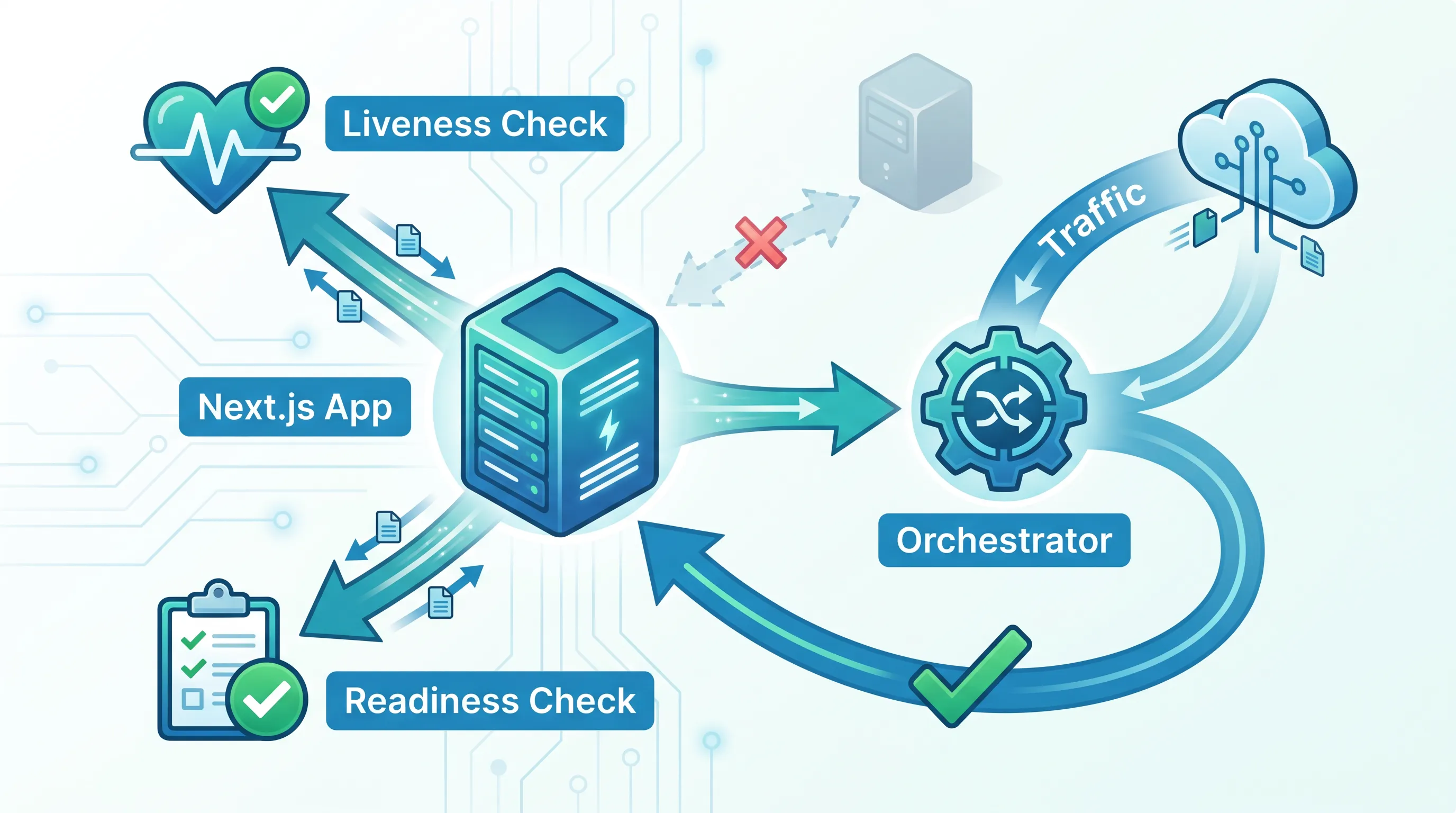
Your Next.js app runs fine on your laptop, and it ran fine on Vercel too — until the day you put it behind your own load balancer or orchestrator, and "is it up?" stopped being a rhetorical question. On Vercel, the platform answers that question for you: every request either hits a healthy serverless function or gets a cold start. The moment you self-host, nobody is answering it anymore, and most teams find out the hard way, during a deploy that sends traffic to a container that hasn't finished starting.
This guide covers what a real readiness endpoint for Next.js looks like, why "the process is running" is not the same as "ready for traffic," and how an orchestrator actually uses the answer.
Why Vercel never made you think about this
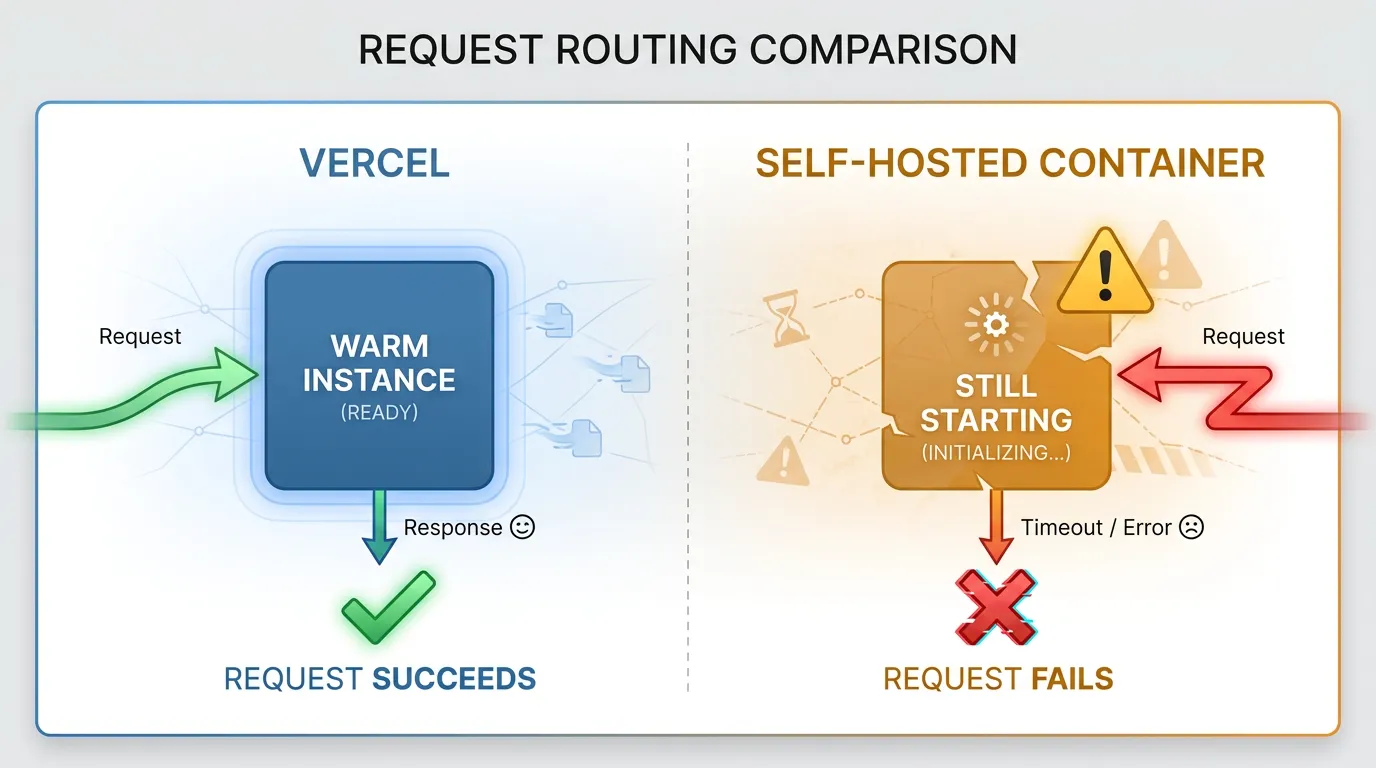
Vercel's platform does three things you stop getting for free once you self-host: it only routes to a function instance after it has initialized, it replaces instances that error out without you writing any code, and it has no concept of a slow, half-started process serving partial traffic. Each request is isolated, so a cold start is visible as latency, not as a 500 from an app that's halfway through connecting to its database.
Self-hosted — on a VM, in Docker Compose, or behind a cluster — none of that is automatic. A container can accept TCP connections on port 3000 the instant the process starts, long before Next.js has finished loading routes, warming caches, or opening a connection pool to your database. If your load balancer or orchestrator starts sending real users to that container right away, they get errors during every single deploy.
"Running" and "ready" are different questions
A liveness check answers "is the process alive, or should it be restarted?" A readiness check answers "is this instance fit to receive traffic right now?" Next.js gives you neither out of the box — you have to decide what "ready" means for your app and expose it yourself.
For most Next.js deployments, ready means three things:
- The server has finished its startup work (this is nearly instant for Next.js itself, but not for your own initialization code)
- Any connections you open eagerly — a database pool, a Redis client, a feature-flag SDK — are actually connected, not just instantiated
- Critical downstream dependencies the app cannot function without are reachable
Notice what's missing: it does not mean "every API your app calls is currently up." A readiness check that fails because a non-critical third-party API is slow will take your whole app offline over a problem that shouldn't have mattered.
Building the endpoint
Next.js Route Handlers (introduced with the App Router) are the natural place for this — they run as plain server code, not React, so there's no rendering overhead involved in answering a health check. The official Route Handlers documentation covers the full API; here's the minimal pattern for readiness:
// app/api/ready/route.ts
import { NextResponse } from "next/server";
import { db } from "@/lib/db";

export async function GET() {
  try {
    await db.query("SELECT 1");
  } catch {
    return NextResponse.json({ status: "not-ready" }, { status: 503 });
  }
  return NextResponse.json({ status: "ready" }, { status: 200 });
}
Keep a separate, cheaper endpoint for liveness — one that doesn't touch the database at all:
// app/api/live/route.ts
import { NextResponse } from "next/server";

export async function GET() {
  return NextResponse.json({ status: "alive" }, { status: 200 });
}
The split matters under load. If your liveness check runs a database query and the database is briefly slow, your orchestrator will see failing liveness probes and start killing and restarting healthy app instances — turning a database blip into a self-inflicted outage.
A few rules worth following here:
- Set a timeout on every check (a database call with no timeout can hang a probe indefinitely)
- Don't check things you can't act on. If your app has no fallback when a third-party API is down, failing readiness over it just takes you offline for no benefit
- Keep the response fast. Probes typically run every few seconds; anything that takes longer than your probe's own timeout will flap between healthy and unhealthy
How an orchestrator actually uses this
Once the endpoint exists, something has to call it. In Kubernetes, that's a readinessProbe and livenessProbe on your Pod spec, documented in full in Kubernetes' guide to configuring probes:
readinessProbe:
  httpGet:
    path: /api/ready
    port: 3000
  initialDelaySeconds: 5
  periodSeconds: 10
  failureThreshold: 3
livenessProbe:
  httpGet:
    path: /api/live
    port: 3000
  initialDelaySeconds: 10
  periodSeconds: 15
This is where the two checks earn their separation. A failing readiness probe just removes the Pod from the Service's load-balancing rotation — no traffic reaches it, but it keeps running and can recover. A failing liveness probe gets the Pod killed and restarted. Point both at the same endpoint and a slow dependency can turn into a restart loop instead of a brief, graceful dip in capacity.
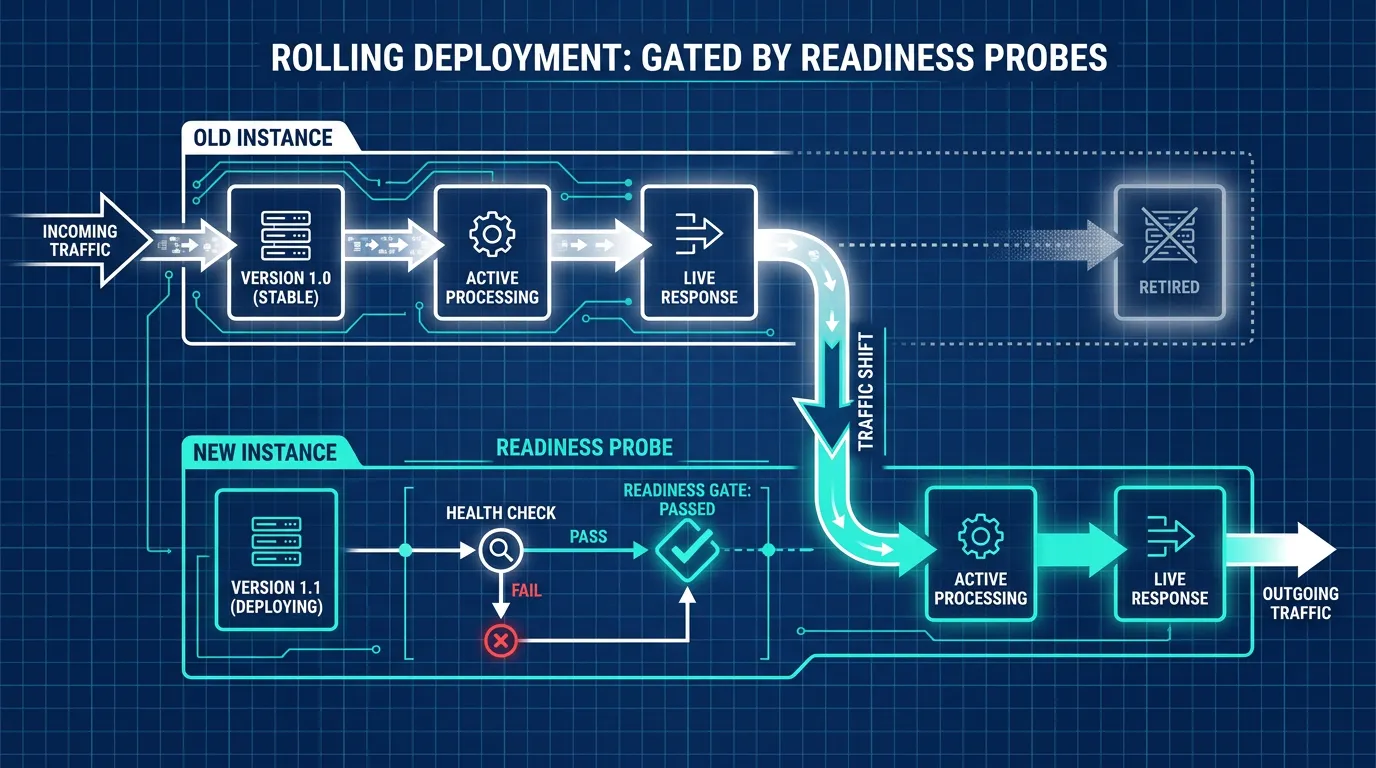
This is also what makes rolling deployments safe. Without a readiness check, an orchestrator has no way to know when a new instance is actually fit to serve traffic — it can only guess based on a fixed delay. With one, it holds traffic back from the new instance until the check passes, and only then retires the old one. That's the difference between a deploy nobody notices and a deploy that produces a burst of errors every time.
This is exactly the gap most self-hosted Next.js deployments fall into: the app starts, the process is alive, but nothing confirms it's actually ready to take traffic. Kubo runs standard Kubernetes under the hood, so once you've built a real readiness endpoint, the platform's probes, rolling updates, and the autoscaling decisions that depend on those same health signals all just work — closer to Vercel's zero-thought deploys, without the single-vendor lock-in.
Readiness checks and autoscaling are the same problem
Health endpoints don't just gate deploys — they're also the signal that scaling decisions quietly depend on. An autoscaler that adds replicas under load is only helping if those new replicas are confirmed ready before traffic is sent their way; otherwise scaling up just multiplies the number of instances returning errors. If you're also tuning horizontal autoscaling for a self-hosted Next.js app, it's worth reading through how HPA, VPA, and KEDA make those scaling decisions — the readiness endpoint you just built is a direct input to that process.
Do you need a full orchestrator for this at all?
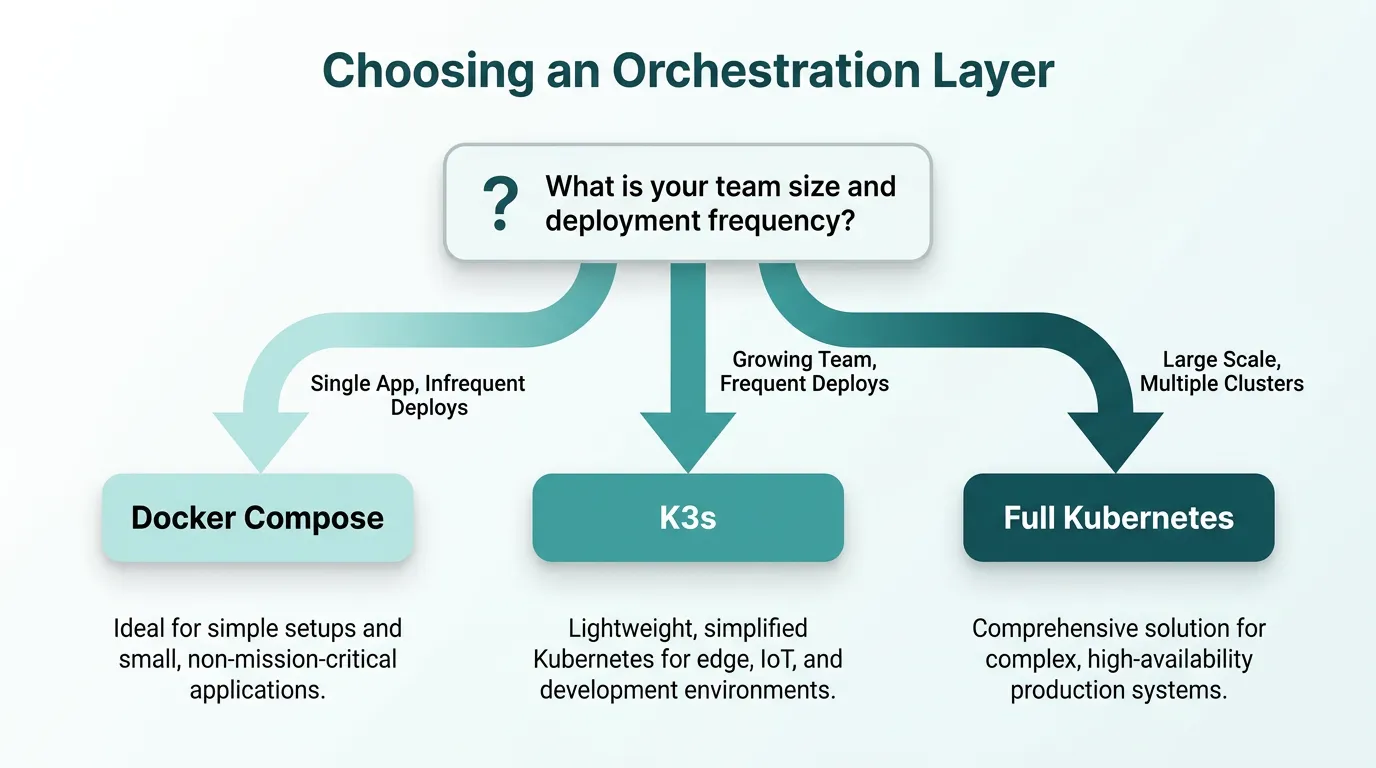
Not every team needs the full Kubernetes feature set just to get working health checks. A single Docker Compose host with a healthcheck: block and a restart policy covers the basics for a small app. The question is when that stops being enough — multiple instances, rolling deploys without downtime, and traffic-aware scaling are the point where you need something that actually reads and acts on readiness state, not just restarts a crashed container. If you're at that decision point, choosing between K3s and a full Kubernetes control plane is a reasonable next read — it's a smaller jump than it looks, and it's the layer that turns your readiness endpoint into actual zero-downtime deploys.
The checklist
Before you call your Next.js app "production ready" for self-hosting:
- A
/api/liveendpoint that returns 200 without touching any dependency - A
/api/readyendpoint that checks only what the app truly cannot run without - Timeouts on every check inside the readiness endpoint
- Separate liveness and readiness probes configured on your orchestrator, not one endpoint doing both jobs
- A rolling deployment strategy that actually waits on the readiness probe before shifting traffic
Once your app can honestly answer "am I ready?", the next decision is what runs it — and that's rarely as simple as "use Kubernetes." See the real cost of running that control plane yourself before you commit to self-managing it.