
COLUMN
29/10/2026
Next.js Database Connections Outside Vercel: Why Serverless Pooling Patterns Break on a Persistent Server
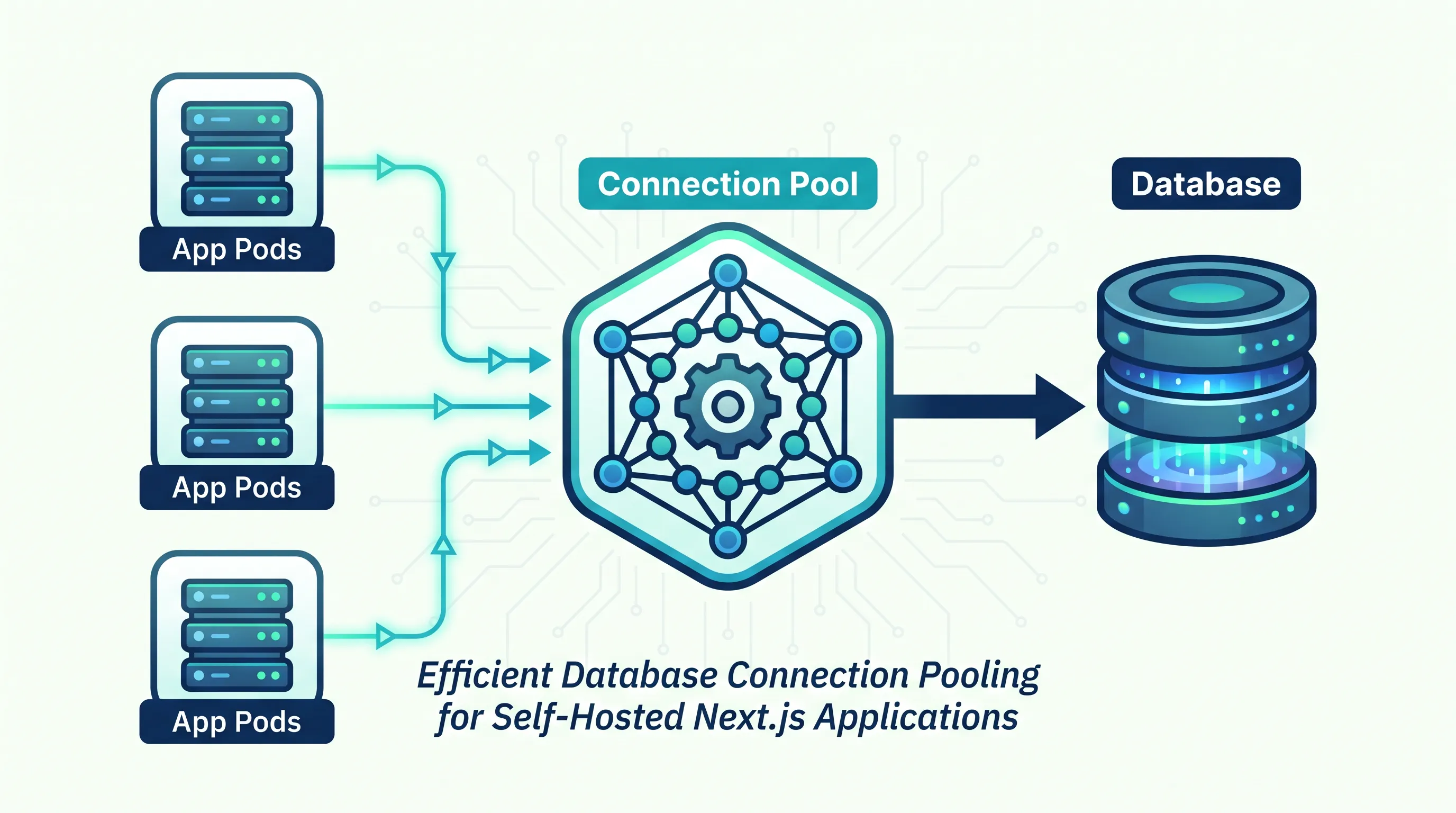
Next.js runs the same fetch calls and the same Prisma client whether it's deployed to Vercel's serverless functions or a long-running Node process on your own infrastructure — but the way those calls open and close database connections is built around two completely different lifecycles. Move the app without rethinking the connection layer, and you'll find that out during a traffic spike, not during testing.
This guide covers what breaks, why it breaks, and what a connection strategy for a persistent server actually looks like.
Why Vercel's connection patterns exist in the first place
On Vercel, each request can be served by a new, short-lived function instance. A Postgres server has a hard cap on concurrent connections — typically in the dozens to low hundreds — and if every one of those ephemeral functions opened its own direct connection, a moderate burst of traffic would exhaust the database before it exhausted anything else.
That's why the ecosystem converged on two patterns:
- An external connection pooler (PgBouncer, or a managed equivalent like Neon's or Supabase's built-in pooler) sits between the app and the database, multiplexing many short-lived client connections onto a smaller set of real database connections.
- A connection-pooling proxy at the ORM layer, like Prisma's Data Proxy / Accelerate, which does the same multiplexing but speaks the ORM's wire protocol and is designed to be instantiated fresh on every invocation.
Both patterns assume the same thing: the thing opening the connection is short-lived and stateless. That assumption is what you lose when you self-host.
What changes on a persistent server
A Next.js app running in a Docker container, a VM, or a Kubernetes pod is a long-lived Node process. It starts once and serves thousands of requests over its lifetime using the same event loop and, if you've set it up correctly, the same database client instance.
This is actually the easier problem to solve — if you know it's different. A few concrete changes:
1. Instantiate the client once, not per-request. This is the most common bug when teams move serverless-first code to a persistent server: a Prisma or pg client gets created inside a request handler or API route, because that pattern was copy-pasted from Vercel-oriented examples where a new instance per invocation was the point. On a long-running process, that turns into a new connection pool spun up on every request, and the old ones are never cleaned up — you exhaust max_connections within minutes under load. Create the client once, at module scope, and reuse it:
// lib/db.js
import { PrismaClient } from '@prisma/client'

const globalForPrisma = globalThis
export const prisma = globalForPrisma.prisma ?? new PrismaClient()

if (process.env.NODE_ENV !== 'production') {
  globalForPrisma.prisma = prisma
}
2. Size the pool to the process, not the request. PrismaClient's own connection pool (connection_limit in the datasource URL, or pool config for pg/mysql2) should be sized for how many concurrent queries one process actually issues — not left at whatever default assumed a single short-lived invocation. A reasonable starting point for a single Next.js instance handling moderate traffic is 5–10 connections; tune from there with actual query concurrency, not guesswork.
3. Multiply by your replica count, not just your pod count. This is the step teams miss first when they move from a single server to Kubernetes. If you run 4 replicas of the app, each with a pool of 10, that's 40 connections before autoscaling adds a fifth or sixth pod. If your database caps out at 100 connections and you're also running background workers, migrations, and an admin dashboard against the same database, the math runs out faster than it looks like it should. 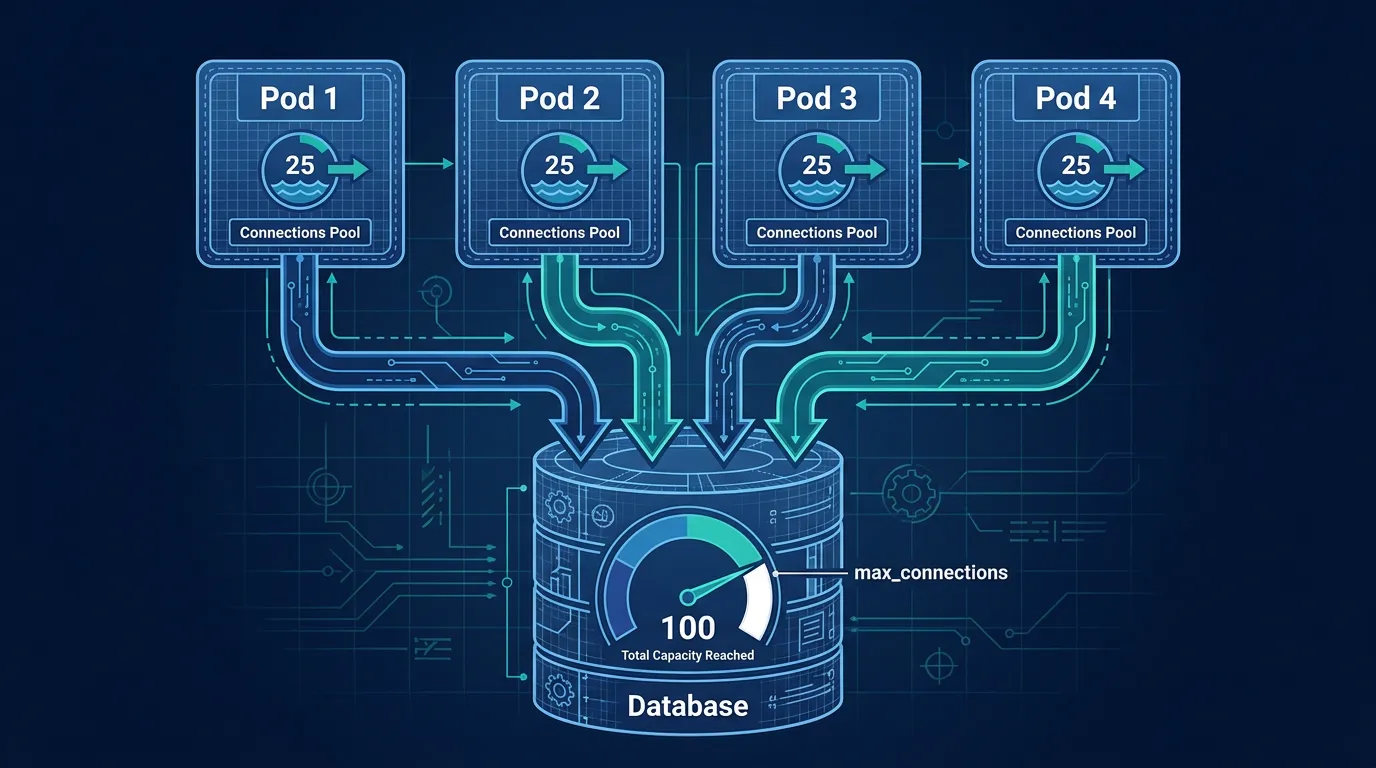 This is exactly why Kubo gives you standard Kubernetes with that plumbing already wired — closer to Vercel's workflow, without locking you into one vendor — so you're reasoning about one scaling model (pods × pool size) instead of guessing which serverless assumption just stopped holding.
4. Drop the serverless-specific proxy, or configure it for long-lived clients. If you're still pointed at Prisma Accelerate or a Data Proxy URL after moving off Vercel, you're adding a network hop and a pricing model designed for ephemeral invocations to a workload that no longer needs it. Point DATABASE_URL directly at your pooler (PgBouncer or your provider's pooled connection string) and let your long-lived client manage its own pool against that.
Handling graceful shutdown correctly
A serverless function doesn't need to worry about in-flight queries when it's recycled — the platform handles that. A pod being terminated during a deploy or a scale-down event does need to worry about it. If Kubernetes sends SIGTERM and your process exits immediately, any query mid-flight is dropped, and depending on your database driver, the connection may be left in a half-open state on the server side.
process.on('SIGTERM', async () => {
  await prisma.$disconnect()
  process.exit(0)
})
Pair this with a reasonable terminationGracePeriodSeconds so in-flight requests have time to finish before the process is killed, not just before the pod is marked for deletion.
Watching the pool before it becomes an incident
On Vercel, connection exhaustion shows up as a spike in function errors you can see in one dashboard. On a self-hosted deployment, it shows up as timeouts that look like they could be the database, the network, or the app — unless you're already measuring pool usage directly. 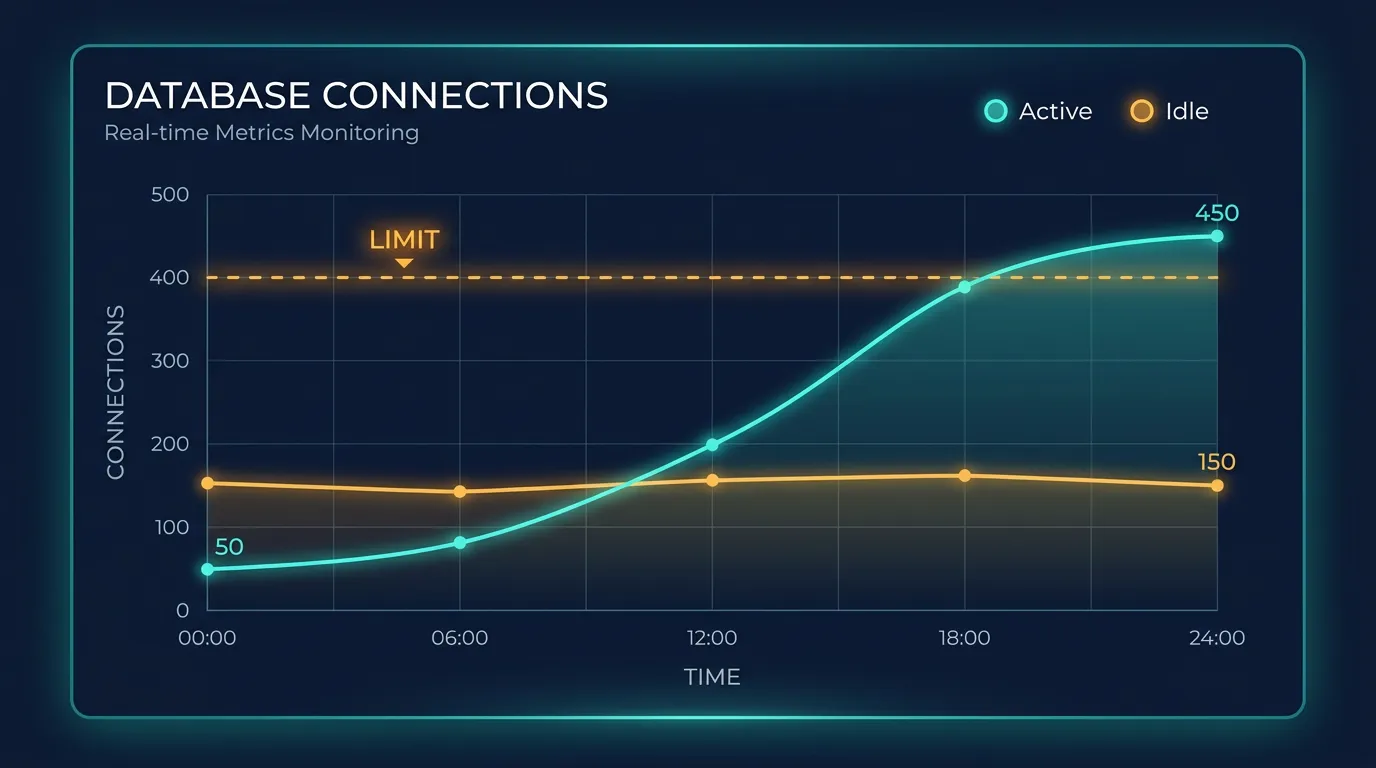 Exporting active/idle connection counts per pod and watching them against your configured
 connection_limit turns a 2am page into a one-line Grafana alert instead of a guessing game. If you're migrating from Docker Compose to Kubernetes, this is one of the things worth instrumenting before the first production traffic spike, not after — monitoring connection pool metrics with Prometheus is a standard pattern for exactly this.
A quick checklist before you ship
- Database client instantiated once at module scope, not inside request handlers
- Pool size set deliberately (not left at a serverless-oriented default)
- Pool size × expected max replica count stays under your database's
max_connections, with headroom for migrations and background jobs - Serverless-specific proxy (Data Proxy / Accelerate) removed or reconfigured, pointing at a real pooler
-
SIGTERMhandled with a clean$disconnect()before exit - Active/idle connection counts exported as metrics, not discovered during an incident
None of this is exotic — it's the same connection discipline that pre-serverless Node apps always needed. The trap is forgetting it was ever a discipline, because Vercel's defaults made it invisible.
Where this fits once you're running more than one app
Connection pooling math gets easier to reason about once you're not hand-tuning it per server. If you're already at the point of running Next.js across multiple replicas and planning for growth, it's worth following K3s production best practices for how resource limits, autoscaling, and connection-heavy workloads are expected to interact — rather than discovering the constraints one incident at a time.
If you're weighing whether to keep stitching this together yourself or hand the orchestration layer to something that already assumes standard Kubernetes, Kubo's plans start at ¥8,800/month for small projects, with the ¥17,600/month tier being the common choice for small to mid-size teams running production workloads. See what Kubo offers and judge it against the hours you'd otherwise spend wiring ingress, autoscaling, and monitoring by hand.