
COLUMN
17/10/2026
Moving a Next.js App Off Vercel: A Step-by-Step Self-Hosting Migration Guide
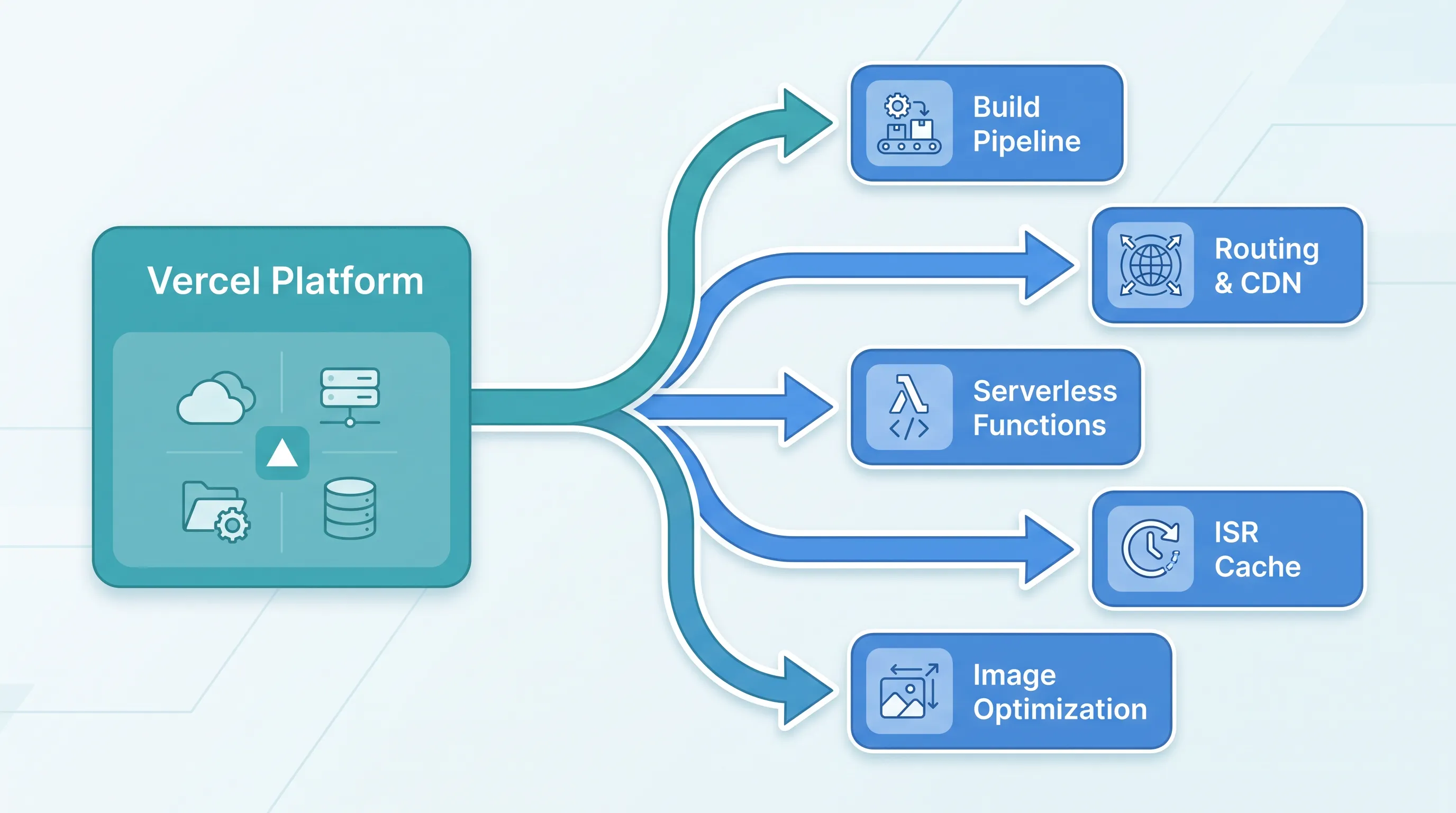
Vercel makes shipping a Next.js app painless right up until the invoice, a compliance requirement, or a feature you can't get on their platform forces the question: what does it actually take to leave? Most guides stop at "why you might self-host." This one covers the migration itself, step by step, from the first next build to the DNS cutover.
What "Leaving Vercel" Actually Means
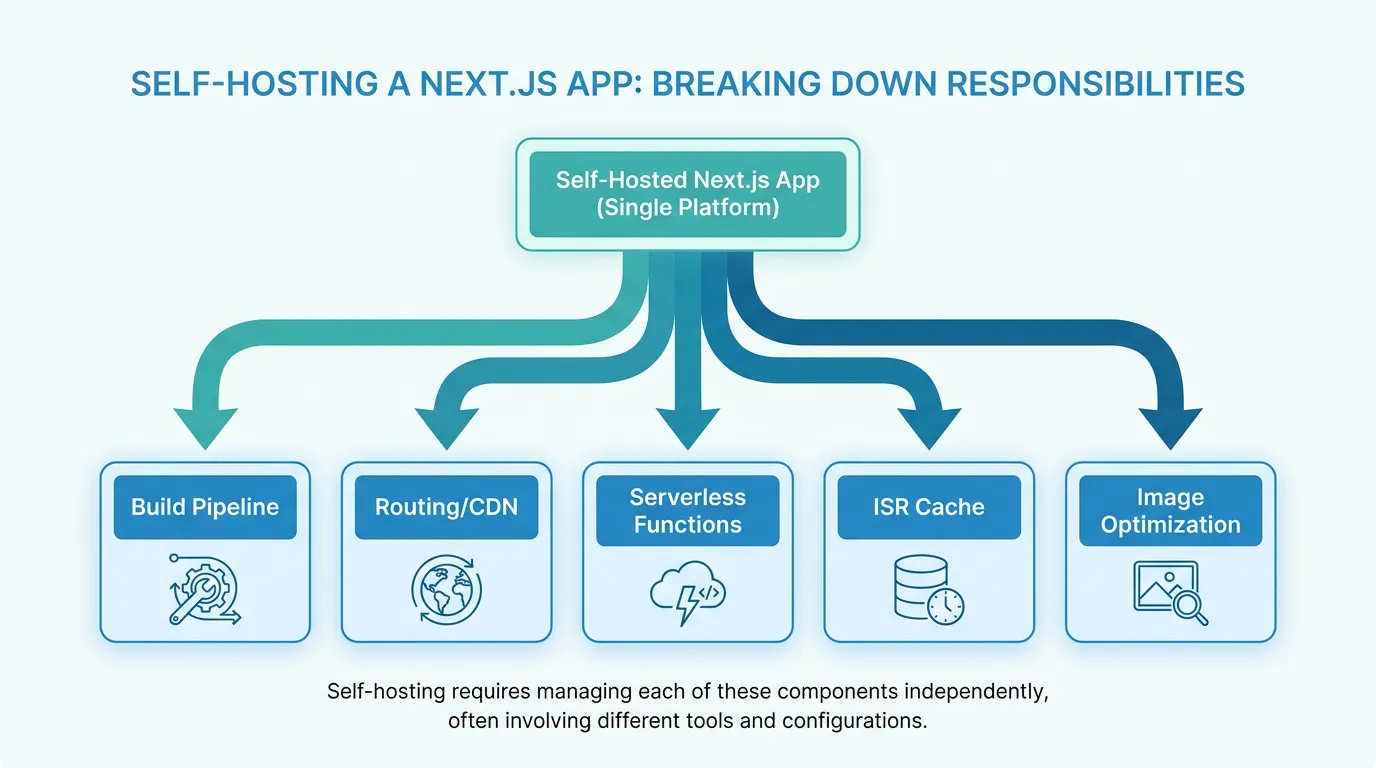
Vercel isn't just a host — it's a build pipeline, a CDN, a function runtime, and an image optimizer bundled together. When you self-host, you're not replacing one service, you're reassembling five:
- Build output — Vercel's build system knows how to read
.next/and wire it into their routing layer. You'll need to produce a deployable artifact yourself. - Routing and headers — rewrites, redirects, and custom headers defined in
next.config.jsneed an equivalent at your ingress or reverse proxy. - Edge/serverless functions — API routes and middleware need a runtime that isn't Vercel's.
- ISR and on-demand revalidation — the cache layer behind
revalidateisn't automatic outside Vercel. - Image optimization —
next/imageneeds a server that can resize and cache images on request.
Treat each of these as a checklist item. Skipping one doesn't break the build — it breaks something in production three weeks later when a redirect silently stops working.
Step 1: Switch to the Standalone Output
Before anything else, add the standalone output mode to next.config.js:
// next.config.js
module.exports = {
  output: 'standalone',
}
This produces a minimal .next/standalone folder with only the files your app needs at runtime, plus a server.js entry point. Without it, you'd otherwise have to ship the entire node_modules tree, which is slower to build and larger to deploy. Run next build and confirm .next/standalone/server.js exists before moving on — this is the file your container will actually run.
Step 2: Containerize the App
Copy the standalone output, the .next/static assets, and the public/ folder into a minimal image:
FROM node:20-slim AS runner
WORKDIR /app
COPY .next/standalone ./
COPY .next/static ./.next/static
COPY public ./public
ENV NODE_ENV=production
EXPOSE 3000
CMD ["node", "server.js"]
Two details that cause real outages: .next/static and public/ are not included in the standalone folder automatically, and Next.js's standalone server binds to 0.0.0.0 on port 3000 by default — set PORT and HOSTNAME env vars explicitly if your platform expects something else.
Step 3: Rebuild Vercel's Routing at the Ingress Layer
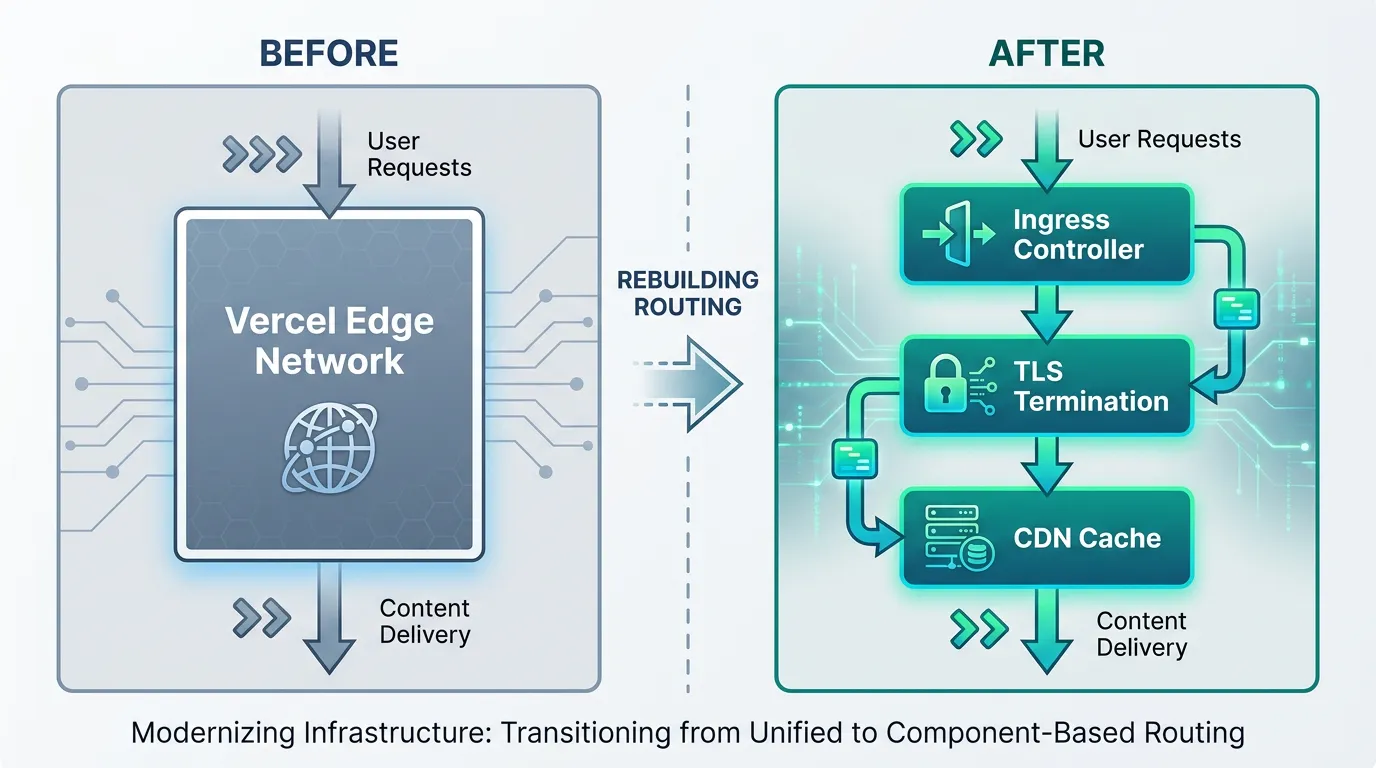
Every redirects(), rewrites(), and headers() entry in next.config.js already works at the application level — Next.js applies them internally regardless of host. What Vercel adds on top is edge-level routing (serving static assets from a CDN before the request ever reaches your app) and TLS termination. Outside Vercel, both become your responsibility: an ingress controller for TLS and host-based routing, plus a CDN or edge cache in front of it if you need the same latency profile.
This is the point where most teams realize the "it's just a Docker container" framing was optimistic — certificates need issuing and renewing, and the ingress config needs maintaining as routes change.
Step 4: Move Environment Variables and Secrets
Vercel's dashboard separates variables by environment (Production, Preview, Development) and by exposure (NEXT_PUBLIC_ vars get inlined at build time; everything else stays server-side). Outside Vercel, that separation doesn't exist by default — you have to recreate it:
NEXT_PUBLIC_*variables must be present at build time, not just at runtime, or they'll bake in asundefined.- Server-only secrets should be injected at runtime via your orchestrator's secret store, not baked into the image.
- If you rely on different values per environment, your CI pipeline needs to build separate images (or rebuild per environment) rather than reusing one image with runtime overrides for public variables.
Step 5: Replace Vercel-Specific Features
Three features are the most commonly missed:
- ISR (
revalidate) — Vercel's ISR relies on their own cache invalidation at the edge. Self-hosted,revalidatestill works for time-based regeneration, but on-demand revalidation (revalidatePath/revalidateTag) needs a persistent cache layer you control, since the default in-memory cache resets on every pod restart. next/imageoptimization — the built-in image server works fine in a single long-running container, but if you're running multiple replicas without a shared cache, each instance re-optimizes the same image independently. A shared cache or a dedicated image service avoids that duplication.- Cron and scheduled jobs — Vercel Cron doesn't exist outside Vercel; scheduled tasks need to move to your orchestrator's native scheduling (a
CronJobresource, for example) or an external scheduler.
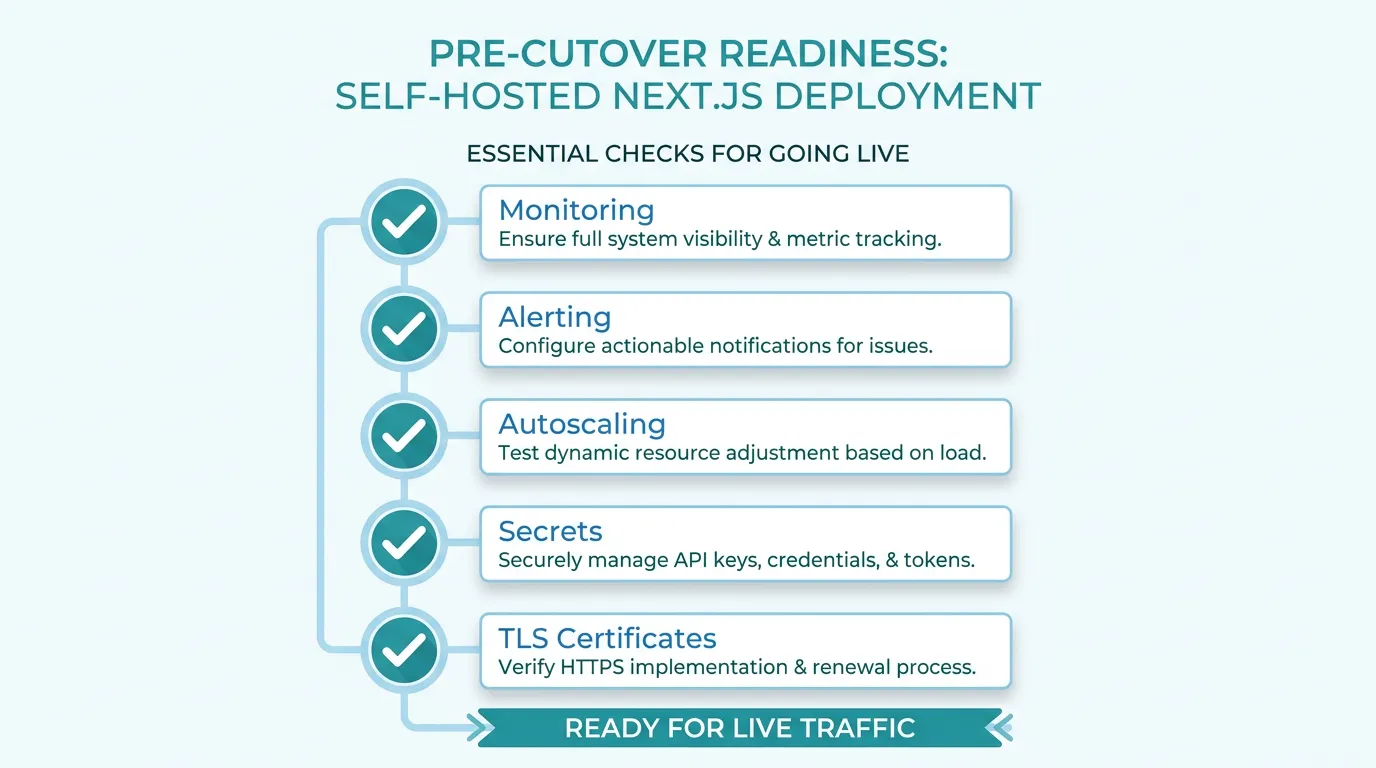
Step 6: Set Up Monitoring and Autoscaling Before Cutover
Vercel scales functions per-request without you thinking about it. A self-hosted deployment doesn't, by default — a traffic spike either queues behind a fixed number of replicas or takes the app down. Decide your scaling policy (CPU-based, request-based, or a mix) and your alerting thresholds before cutover, not after the first incident. If you're running on Kubernetes, autoscaling your workload after migration is worth setting up as a day-one step rather than a reaction to the first traffic spike — HPA for request-driven scale-out, VPA for right-sizing the containers themselves.
This is also the stage where the "just move it to a container" plan tends to collide with reality: ingress, TLS, a secrets store, and autoscaling all need to be wired up before a single feature ships, and that plumbing is exactly what teams underestimate when they budget a migration. Kubo packages that plumbing into a managed K3s environment, so the parts that aren't about your application — ingress, certificates, scaling — come configured rather than hand-built.
Step 7: DNS Cutover and Rollback Plan
Don't point DNS at the new environment until it has handled real traffic in parallel. A practical sequence:
- Deploy the self-hosted version behind a separate subdomain and run it against production data for at least a few days.
- Lower your DNS TTL to 5 minutes a day or two before cutover, so a rollback propagates fast if needed.
- Cut over, then keep the Vercel deployment running (not deleted) for at least a week as a rollback target.
- Watch error rates and response times closely for the first 24–48 hours — this is when ISR cache misses, missing environment variables, and routing mismatches tend to surface.
If something breaks, the rollback is just a DNS change back to Vercel — which is the whole reason to keep it running rather than tearing it down on day one.
Where This Leaves You
Managed Kubernetes often gets ruled out early because teams assume the operational burden is the same as running it from scratch — but that's not always true, and the real cost of managed Kubernetes is worth checking against your own numbers before deciding. If you're moving a single app off Vercel and want standard Kubernetes without hand-building ingress, TLS, and autoscaling yourself, the Ashigaru plan starts at ¥8,800/month for a single app, and most small teams moving production workloads land on Ronin at ¥17,600/month. Compare the plans against what you've just scoped out above, and start with the one that matches the workload you're actually migrating.