
COLUMN
13/10/2026
Kubernetes for a Small Team: What You Actually Need (and What You Don't)
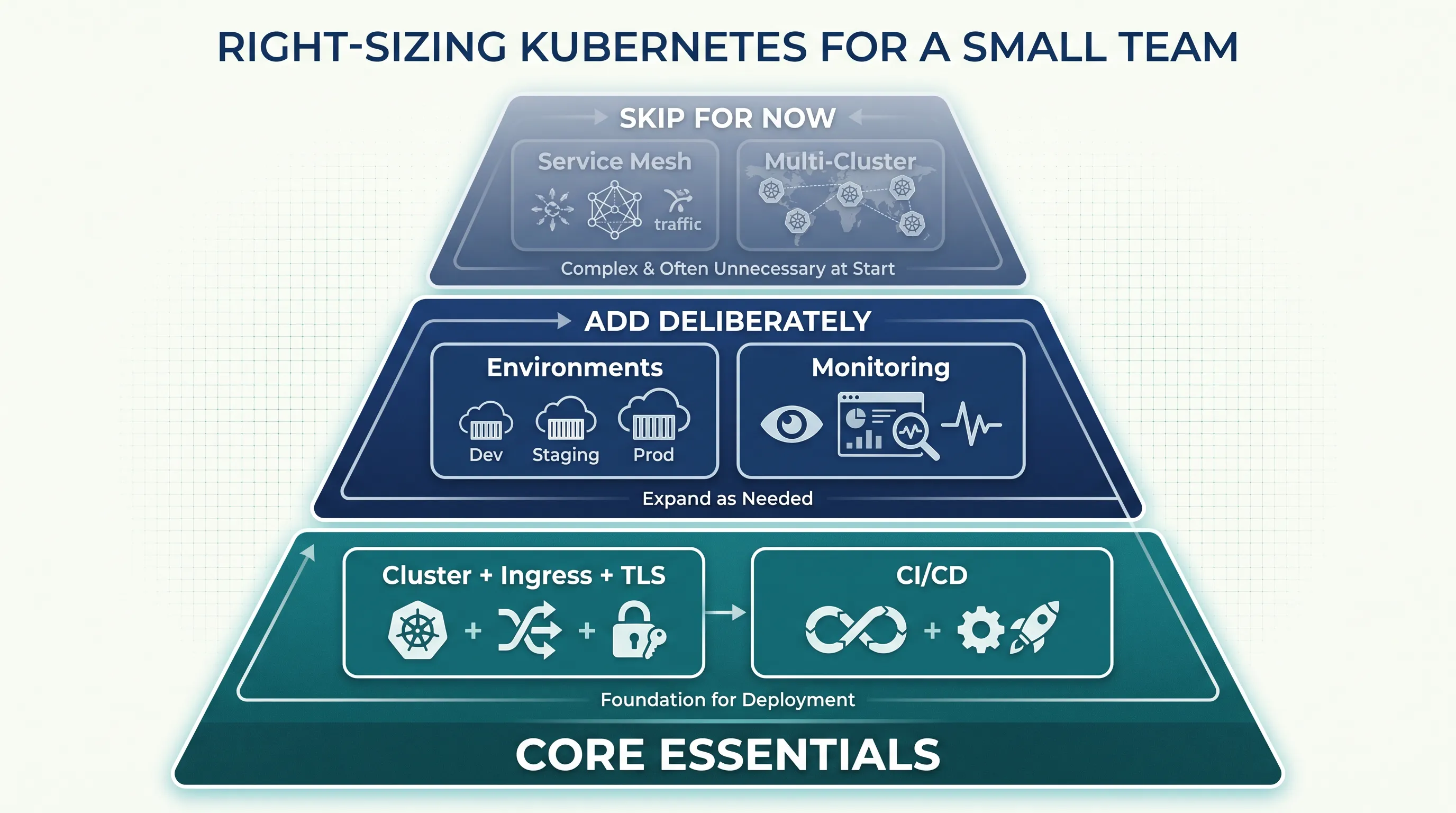
You've decided Next.js is moving to Kubernetes. The harder question is what else comes with it — and how much of it you actually need on day one.
Most Kubernetes guides are written for platform teams at companies with dozens of services and a dedicated infra group. A five-person team shipping one or two apps doesn't need that setup, but it's easy to copy it anyway, because every tutorial assumes you want the full stack: a dozen namespaces, a service mesh, a GitOps pipeline with four environments, and an observability stack with more dashboards than engineers. None of that is wrong — it's just sized for a different team.
This is a working list of what a small team running production workloads on Kubernetes actually needs, and what can reasonably wait.
The part you can't skip: a cluster, ingress, and TLS
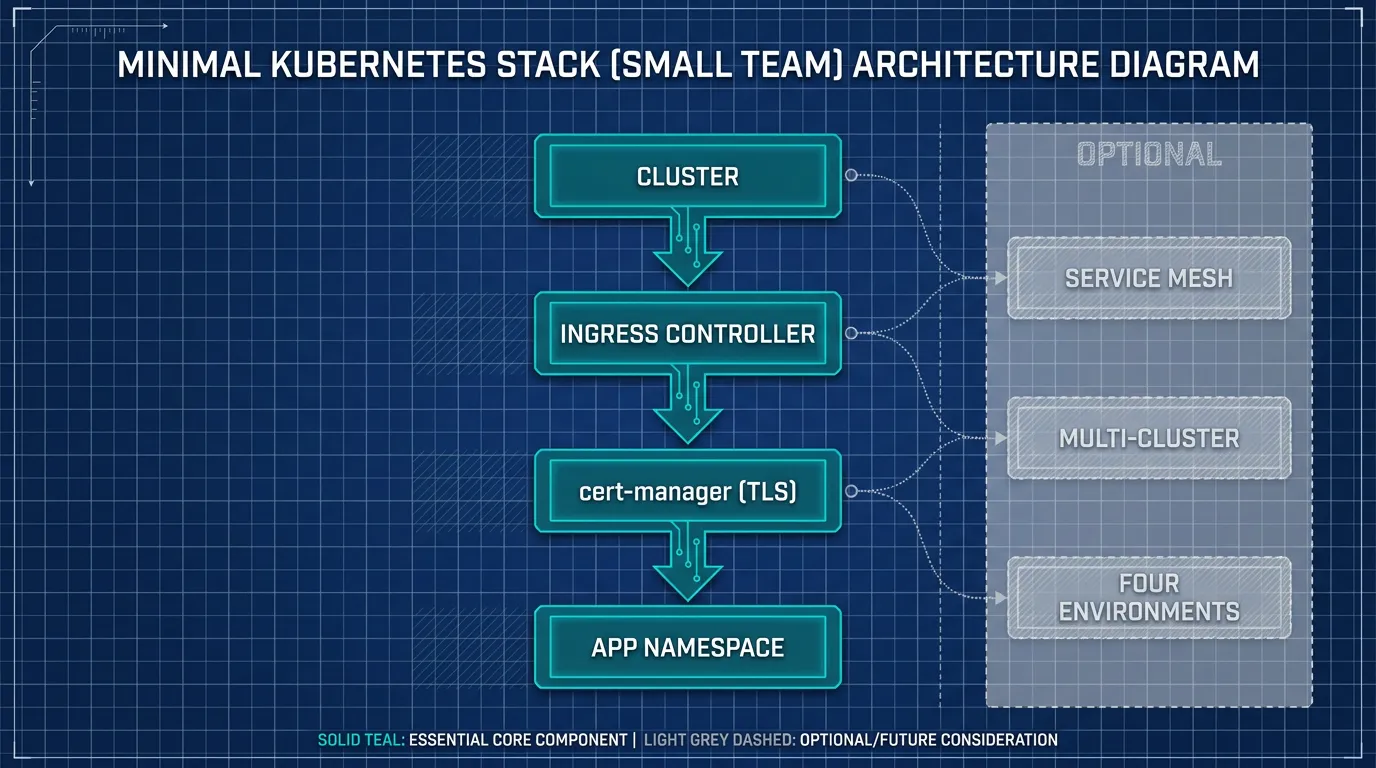
Three things are non-negotiable the moment real traffic hits your app.
A cluster that someone patches. Kubernetes itself needs version upgrades, node patching, and etcd backups. If nobody on the team wants that job, a managed control plane removes it without changing how you deploy workloads — you still write the same manifests and run the same kubectl apply.
An ingress controller. Something has to route external traffic to the right Service and terminate TLS. NGINX Ingress Controller and Traefik are the two most common choices, and either is fine for a small app — the decision matters far less than actually having one configured before launch.
Certificates that renew themselves. cert-manager issuing from Let's Encrypt is the standard answer here. Set it up once, point an Issuer at your ingress, and stop thinking about TLS expiry.
If you have those three, you have a cluster that can serve real users. Everything after this is about running it safely over months, not about getting the first deploy out.
Environments: start with fewer than you think
Tutorials default to four environments — dev, staging, QA, production — because that's what large orgs settled on after years of incidents. A small team copying that structure on day one pays for namespaces, config, and secrets management four times over, for workflows nobody has stress-tested yet.
A more honest starting point for most small teams is two: a production namespace, and a single shared non-production namespace for everything else (feature branches, manual QA, demos). You can use resource quotas to keep the non-production namespace from starving production of CPU and memory on the same cluster, and Kubernetes RBAC to make sure only the right people can touch production.
Add a third or fourth environment when a specific, named problem shows up — compliance requires isolated data, or two features regularly conflict in the shared namespace. Don't add it because a blog post said so. For a longer framework on deciding how many environments you actually need and when namespace sprawl starts costing more than it protects, see how many environments you actually need.
Observability: one dashboard beats three tools you never open
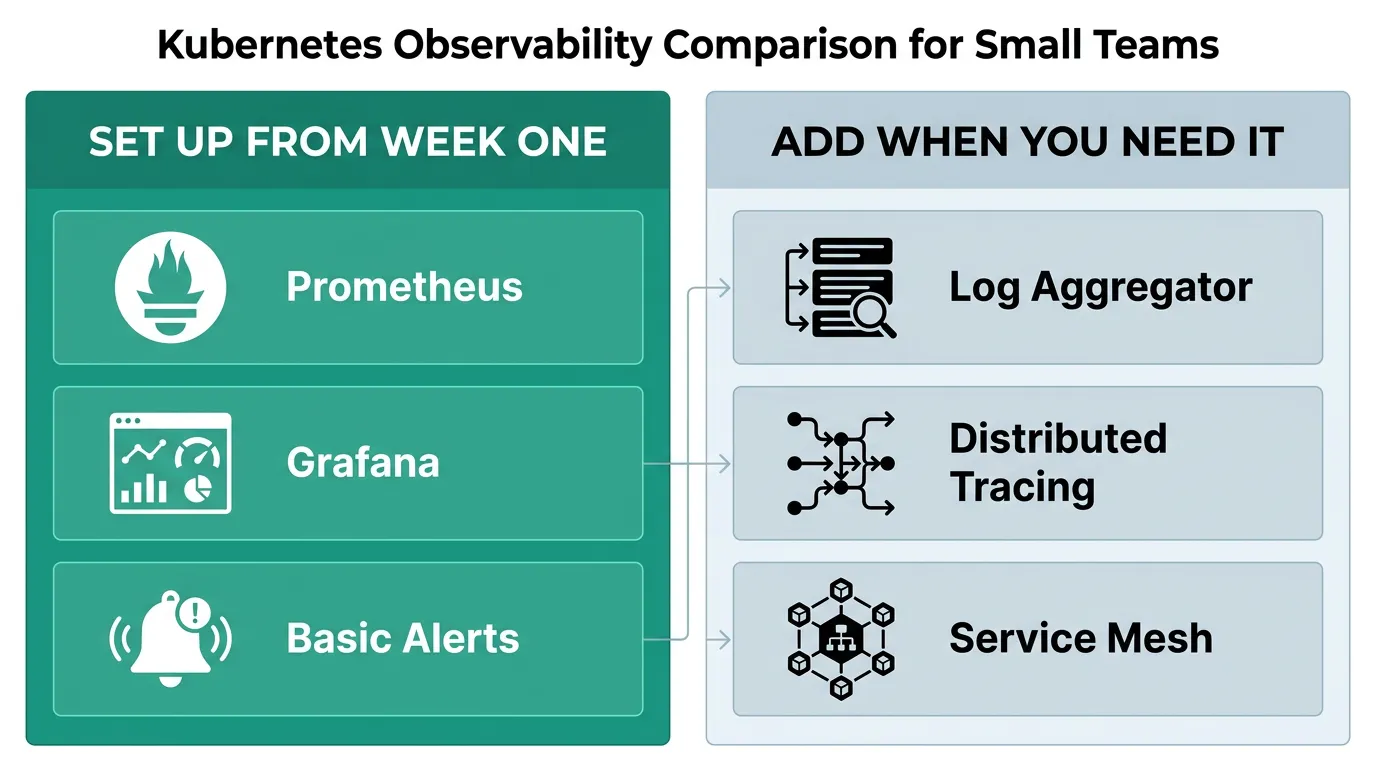
The standard advice is Prometheus for metrics, a log aggregator, and a tracing backend, each with its own retention policy and its own on-call runbook. For a small team, that's three systems to maintain and zero of them get looked at consistently.
Start with one: Prometheus plus Grafana, covering CPU, memory, pod restarts, and request latency if your ingress controller exposes it. That combination answers "is something actually wrong" for most incidents a small team hits. Logs can live in kubectl logs and your cloud provider's basic log retention until volume or compliance forces a real aggregator. Distributed tracing is worth adding once you have more than two or three services calling each other — before that, it mostly traces calls you could already explain from memory.
A working Prometheus setup walks through the install and the handful of alerts worth configuring from week one, rather than the full alerting catalog most guides ship with.
CI/CD and security: borrow a checklist, don't invent one
A small team doesn't need to design its own deployment pipeline or security review from scratch — both are solved problems, and the risk is skipping steps because nobody wrote them down.
For deployment, a simple pipeline that builds an image, pushes it to a registry, and applies updated manifests on merge to main covers most small-team needs. GitHub Actions or GitLab CI both handle this without extra tooling. GitOps controllers like ArgoCD add real value once multiple people are deploying multiple services and you want a single source of truth for what's actually running — it's a reasonable "add later" rather than a day-one requirement.
For security, the baseline worth having before launch is small: run containers as non-root where the base image allows it, scan images for known CVEs in CI rather than after deployment, and apply at least one NetworkPolicy that denies traffic between namespaces by default. None of this requires a dedicated security engineer — it requires doing it once and keeping it in the same manifests you already version-control.
A production best-practices checklist is a useful gut-check against what you've actually wired up versus what you've been meaning to get to.
What to skip until you actually need it
A short list of things that show up in "Kubernetes best practices" posts but aren't day-one requirements for a small team:
- A service mesh (Istio, Linkerd). Useful for fine-grained traffic control and mTLS between dozens of services. Overhead you'll feel immediately with three services.
- Multi-cluster setups. Solve a specific problem (regional failover, strict compliance boundaries). Most small teams don't have that problem yet.
- Custom operators. Writing your own Kubernetes operator is a multi-week investment that pays off at a scale most small teams haven't reached.
- A platform team's worth of Helm charts. One well-documented chart per service is plenty until you're maintaining more than a handful.
Adding these early doesn't make the system more production-ready — it adds surface area that a small team now has to understand, patch, and debug, without the traffic or team size that justifies the cost.
Where this gets easier
When a small team sets up its first cluster, this is where things sprawl — environments, monitoring, CI/CD, security, all at once, each with its own setup steps and its own way of breaking. Kubo gives you standard Kubernetes with that plumbing pre-wired, closer to Vercel's workflow, without the weeks of setup self-hosting usually takes. You still get real kubectl access and standard manifests — nothing proprietary to relearn if you outgrow it.
Start minimal, add deliberately
The pattern across all of this is the same: ship the non-negotiable core first — cluster, ingress, TLS — then add environments, observability, and tooling one deliberate step at a time, each time a specific problem forces it. That's slower-looking on paper than copying a reference architecture built for a 50-engineer org, but it's the version a small team can actually operate without a dedicated platform hire.
If you're a small team sizing this out, the Ashigaru plan starts at ¥8,800/month for individual projects, and most small teams land on Ronin at ¥17,600/month. Compare the plans and start with the one that matches your workload.