
COLUMN
20/10/2026
Next.js Behind a Reverse Proxy in Production: nginx and Traefik Headers, basePath, and Trailing Slashes
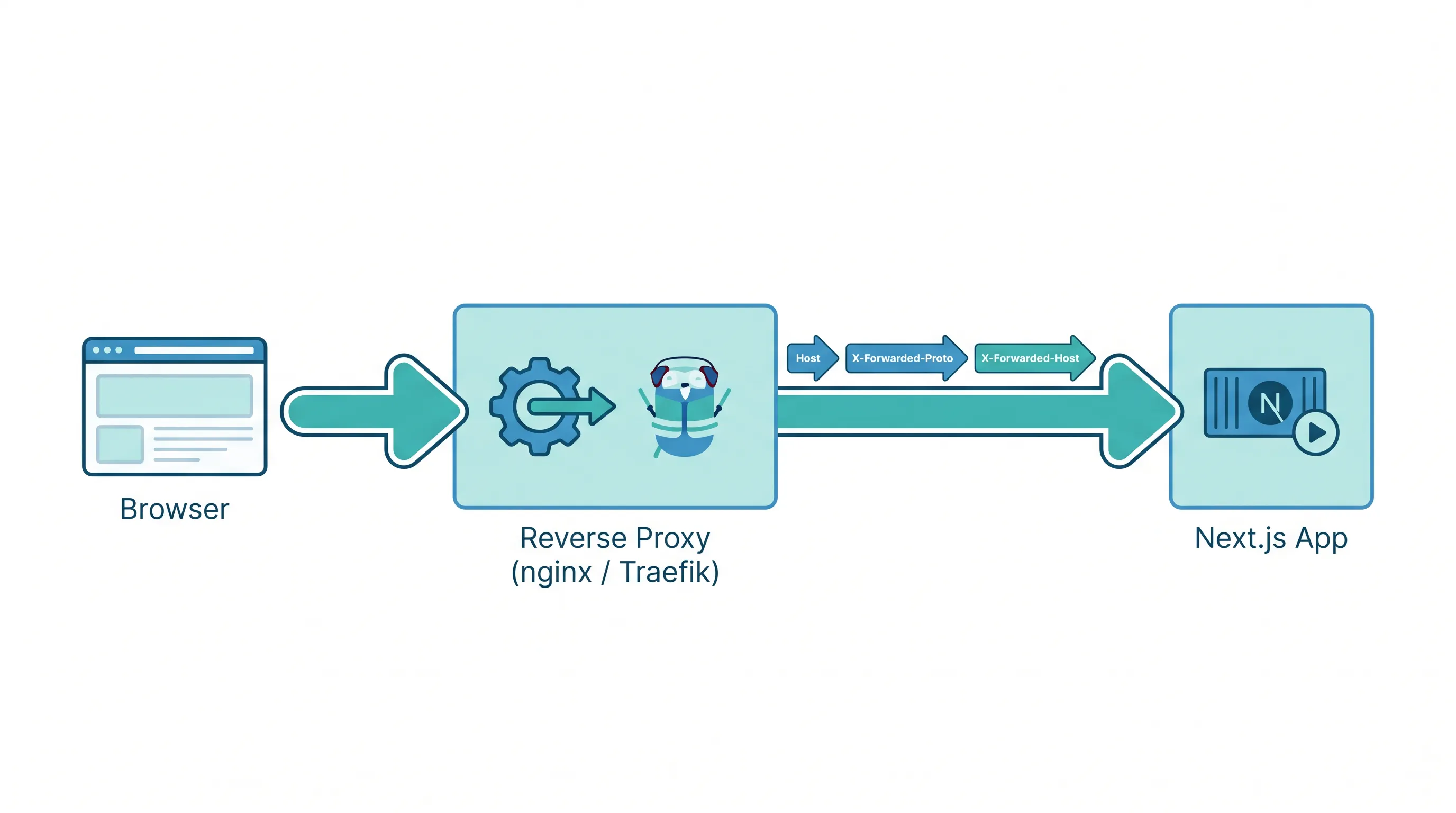
Next.js runs fine on localhost:3000. The problems start the moment you put nginx or Traefik in front of it — which is almost always, since a reverse proxy is how you get TLS termination, a stable domain, and more than one service on the same box. The app boots, pages load, and then one specific thing breaks: a redirect loop, a 404 on /_next/static/..., or a cryptic "Invalid Server Action request" in the logs. None of these are Next.js bugs. They're mismatches between what your proxy does to the request and what Next.js assumes about it.
This is a tour of the four places that mismatch shows up, and the real next.config.js and proxy config that fixes each one.
1. Trailing slashes: pick one, make both layers agree
Next.js has a trailingSlash option, and it's false by default — /about is canonical, /about/ redirects to it. Plenty of nginx configs do the opposite: a common location block pattern normalizes paths to end in a slash before proxying upstream.
When those two disagree, you get a redirect loop: nginx rewrites /about to /about/, proxies it to Next.js, Next.js's router sees /about/ and 308-redirects back to /about, nginx rewrites it again. Browsers eventually give up with ERR_TOO_MANY_REDIRECTS.
The fix isn't in nginx — it's deciding which convention you want and setting trailingSlash to match:
// next.config.js
module.exports = {
  trailingSlash: true, // only if your proxy/CDN forces trailing slashes
}
If you don't control the proxy's rewrite rules (a shared ingress, a CDN in front of it), check what it actually sends upstream before touching next.config.js — curl the proxy with -v and look at the Location or the forwarded path, don't guess from the config file.
2. basePath vs. path-based routing at the proxy
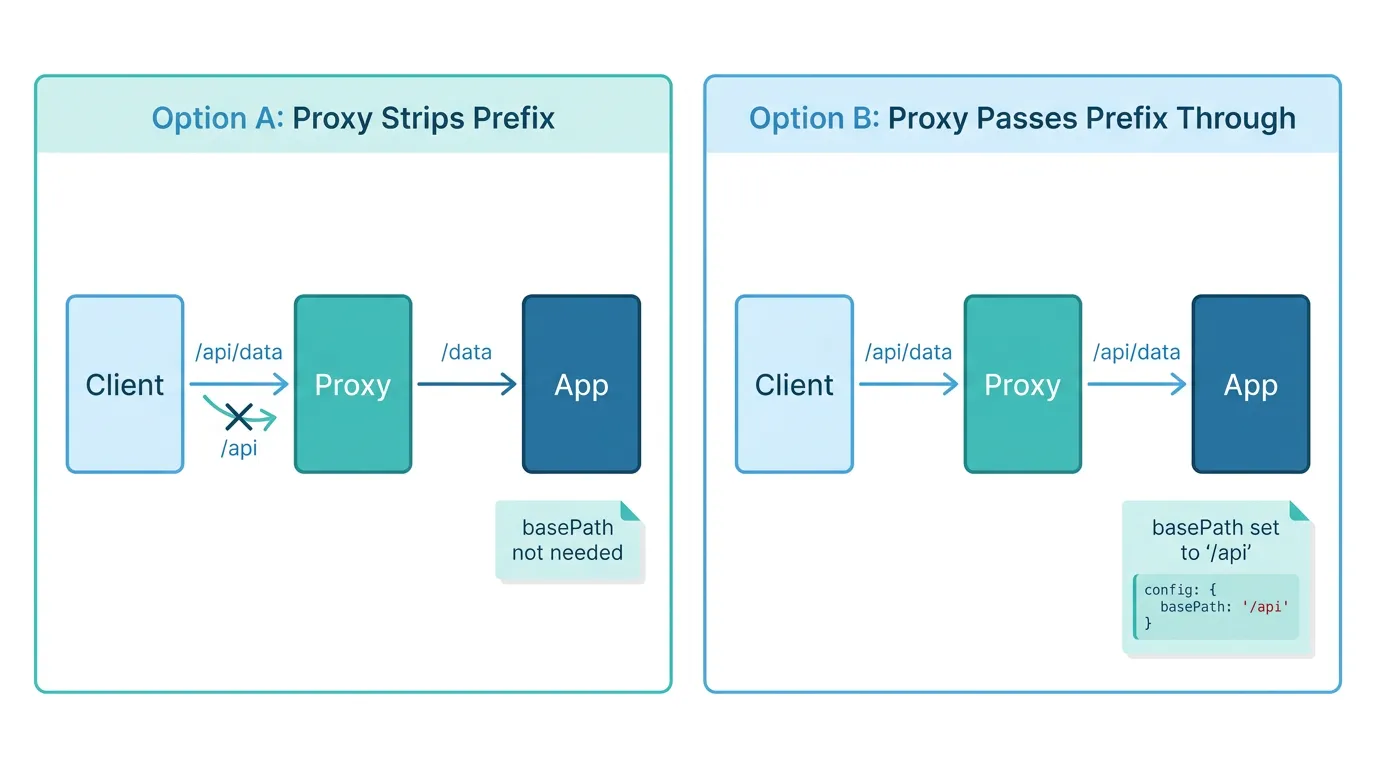
A common pattern: example.com/app should hit your Next.js deployment, while example.com/ and other paths go elsewhere. Two ways to make that work, and mixing them is the usual mistake.
Option A — the proxy strips the prefix. nginx forwards /app/dashboard to Next.js as /dashboard. In this case, Next.js needs no basePath at all; it genuinely doesn't know it's being served under a prefix.
Option B — the proxy passes the prefix through unchanged. nginx forwards /app/dashboard to Next.js as /app/dashboard. Now Next.js needs to know about it:
// next.config.js
module.exports = {
  basePath: '/app',
}
With basePath set, Next.js automatically prefixes /app onto <Link> hrefs, router.push() calls, and static asset URLs under /_next/. The failure mode when teams get this wrong is specific: they set basePath: '/app' and have nginx strip the prefix, so every asset request Next.js emits (/app/_next/static/...) arrives at the Next.js server as /_next/static/... doesn't exist — it's listening for /app/_next/... because that's what basePath tells it to expect. Decide once, at the proxy layer, which option you're using, and configure next.config.js accordingly — not both.
If your static assets are served from a separate CDN or host entirely (not proxied by the same nginx/Traefik instance as the app), that's what assetPrefix is for — it only changes where _next/static files are fetched from, independent of basePath:
// next.config.js
module.exports = {
  assetPrefix: 'https://cdn.example.com',
}
3. Server Actions and the Origin header
If you're using Server Actions (form submissions and mutations that run on the server without a separate API route), Next.js checks that the request's Origin header matches the Host it was served from, as a CSRF protection. Behind a reverse proxy, this check is where self-hosted deployments most often break in a way that's confusing to debug.
Here's the mechanism: your browser sends requests to https://example.com, so Origin is https://example.com. But if your proxy forwards the request to the Next.js container without correctly passing the original host — forwarding it as http://next-app:3000 internally, for instance — Next.js sees a Host that doesn't match the Origin, and rejects the Server Action with a 403 and "Invalid Server Action request" in the server logs.
Two things fix this, and you generally need both:
First, the proxy has to forward the original host correctly. In nginx:
location / {
    proxy_pass http://127.0.0.1:3000;
    proxy_set_header Host $host;
    proxy_set_header X-Forwarded-Proto $scheme;
    proxy_set_header X-Forwarded-Host $host;
}
And the equivalent Traefik docker labels:
- "traefik.http.routers.nextjs.rule=Host(`example.com`)"
- "traefik.http.services.nextjs.loadbalancer.server.port=3000"
Traefik forwards the original Host header by default when routing on a Host rule, so the common Traefik mistake is elsewhere — usually a second proxy (a CDN, a load balancer) in front of Traefik that doesn't forward X-Forwarded-Host consistently.
Second, if you're running on multiple domains, or behind a proxy layer whose forwarded host still doesn't line up cleanly with what Next.js expects, declare the allowed origins explicitly:
// next.config.js
module.exports = {
  experimental: {
    serverActions: {
      allowedOrigins: ['example.com', '*.example.com'],
    },
  },
}
allowedOrigins doesn't replace correct header forwarding — it's the explicit allowlist Next.js checks the Origin header against, on top of the Host match. Set both.
4. Binding the standalone server to the right interface
If you're deploying with output: 'standalone', the generated server.js reads HOSTNAME and PORT from the environment to decide what to bind to. The default HOSTNAME is 0.0.0.0 when unset, which is what you want in a container — localhost would make it unreachable from outside the container's network namespace, which includes your reverse proxy if it's running as a sidecar or in a different container.
HOSTNAME=0.0.0.0 PORT=3000 node server.js
This is the thing to check first when a proxy returns 502 Bad Gateway and the container logs show the app started successfully — "started successfully" and "bound to the interface your proxy can reach" are not the same fact.
Where this stops being a one-server problem
Everything above assumes one Next.js container behind one proxy on one host. That setup is genuinely fine for a lot of production apps — it's not a reason to reach for anything more complex. The reverse-proxy quirks above start compounding, though, once you're running more than one instance of the app for redundancy, or more than one service behind the same proxy with different routing rules, or you need the proxy config itself to be reproducible across environments instead of hand-edited on a box.
At that point you're not writing more nginx — you're writing the first Kubernetes Ingress resource, because that's what Ingress controllers are: the same header-forwarding and path-routing rules you've been hand-tuning, expressed as config that's applied consistently and reproducibly. If your current setup is a docker-compose.yml with an nginx service and an app service, the move is incremental rather than a rewrite — see this walkthrough on migrating from Docker Compose to Kubernetes for what actually changes and what doesn't.
This is also where it's worth deciding how much of the cluster plumbing you want to own yourself. Kubo runs standard Kubernetes underneath, so Ingress, TLS certificates, and the health-check and readiness conventions your container already follows carry over directly — you get Vercel-level simplicity for the deploy step without being locked into a proprietary runtime, and the same cluster definition works whether you're running in the cloud or on your own hardware.
Before you move anything, though, it's worth reading up on what "production-ready" actually means for a cluster you're going to run day to day — not just how to deploy to it once. This guide to K3s production best practices covers the operational details (backups, upgrades, resource limits) that a single-proxy setup never forces you to think about, because there's only one server to reason about.
And if you're weighing whether you even need the extra environments that come with a cluster — separate staging, preview, and production namespaces instead of "the one server" — this breakdown of how many environments you actually need is a reasonable next read before you commit to a specific setup.
None of this means you need a cluster today. A single Next.js container behind nginx or Traefik, configured correctly, is a legitimate production setup — the point of this guide is to make sure it's configured correctly, not to talk you out of it.
A short checklist
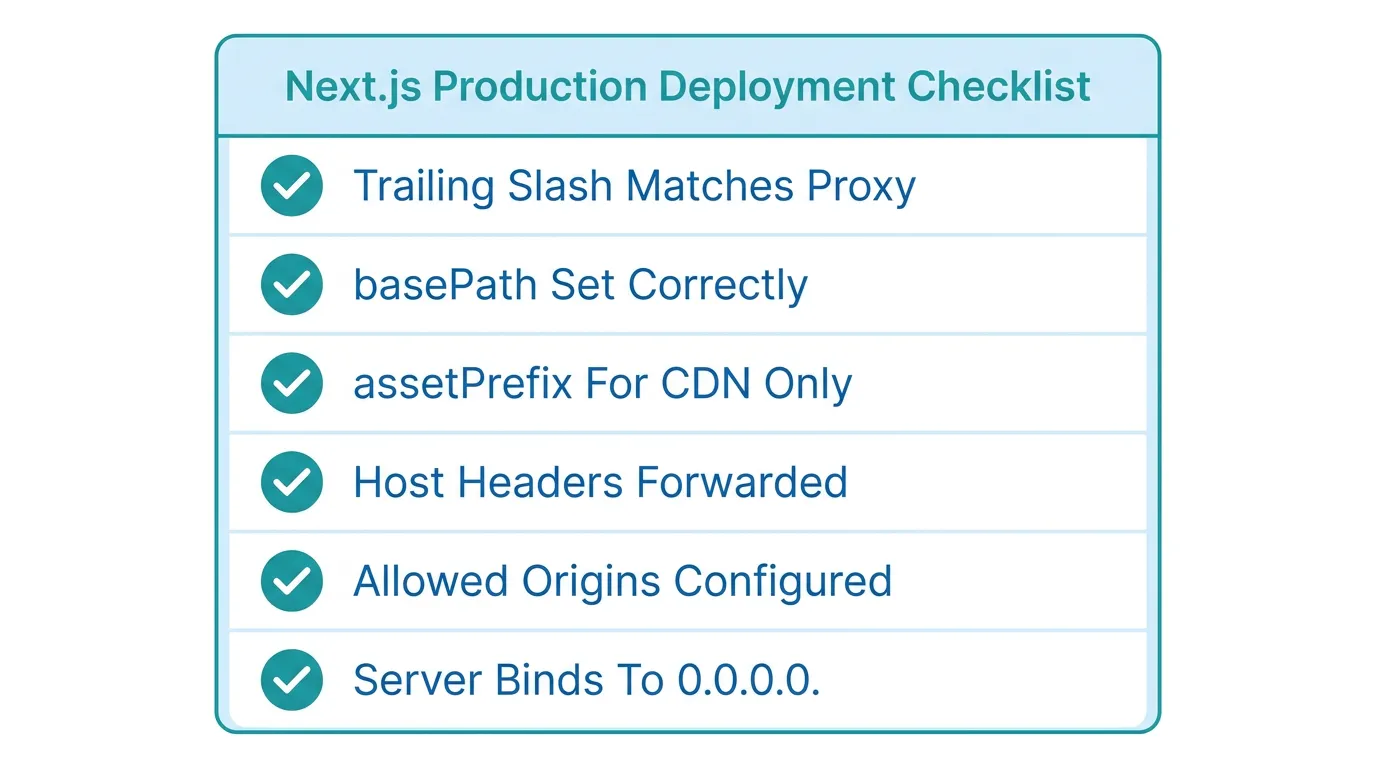
trailingSlashinnext.config.jsmatches what your proxy actually forwards (verify withcurl -v, don't assume)basePathis set only if the proxy passes the path prefix through unchanged — not if the proxy strips itassetPrefixis set only when_next/staticis served from a different host than the app itself- The proxy forwards
Host,X-Forwarded-Proto, andX-Forwarded-Host— required for Server Actions' origin check to pass experimental.serverActions.allowedOriginslists every domain the app is actually served from, if you're on multiple domains or behind a proxy chain- The standalone server binds to
HOSTNAME=0.0.0.0, notlocalhost, inside its container
Every one of these is a config mismatch, not a Next.js limitation — which is exactly why they're frustrating to debug from the Next.js side alone. Check the proxy's actual behavior first, then make next.config.js agree with it.