
COLUMN
27/10/2026
Next.js File Uploads Failing Behind Nginx: Fixing 413 Request Entity Too Large in Production
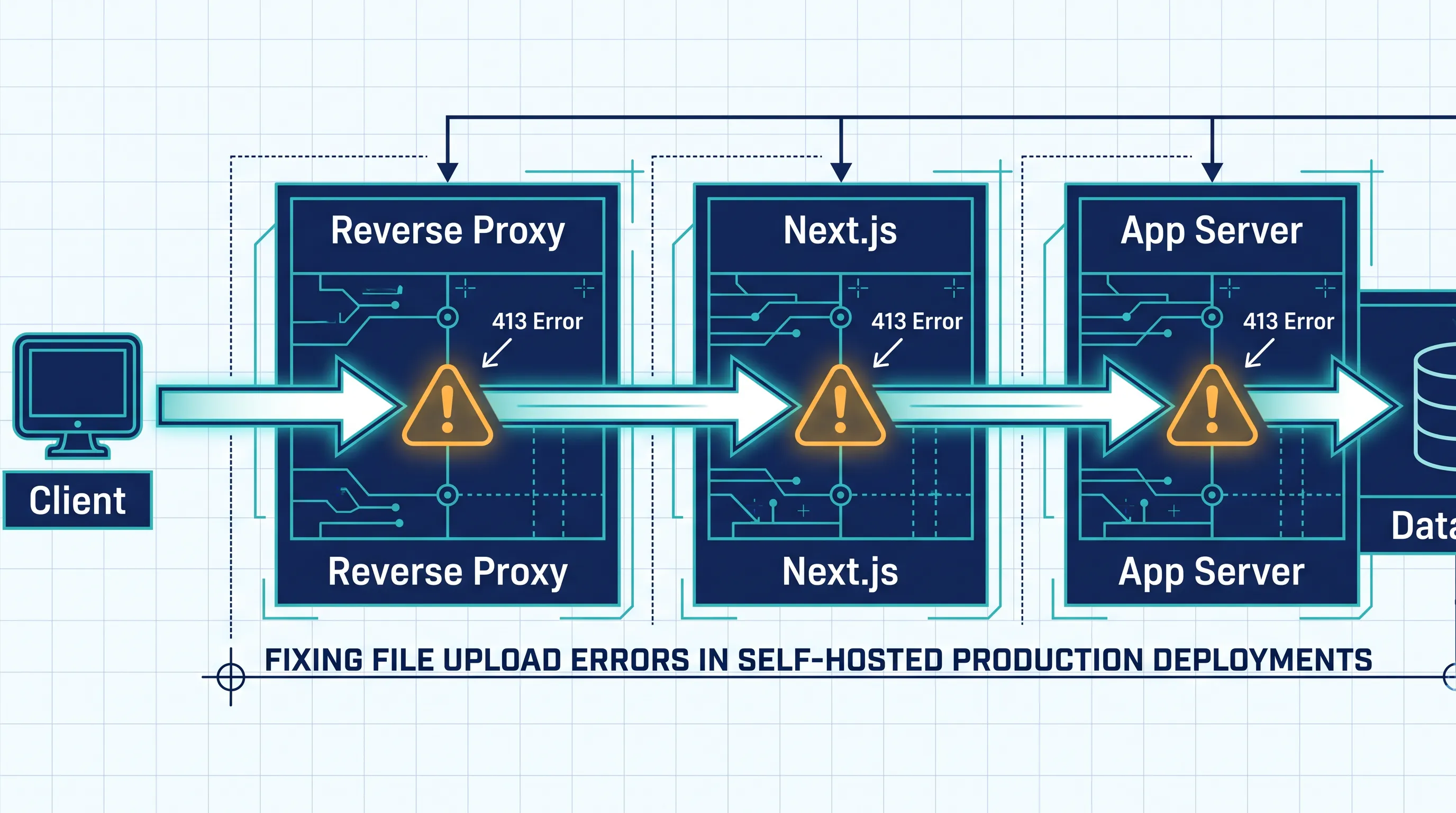
Add a file upload form to a self-hosted Next.js app, test it with a real file, and you'll likely hit a wall: 413 Request Entity Too Large. The app works fine in next dev. It works fine on Vercel. It only breaks once you put your own reverse proxy in front of it. That gap — between "works locally" and "works behind nginx in production" — is what this guide covers.
Why this only shows up in production
On Vercel, request body limits are handled for you, tuned to the platform's own infrastructure. The moment you self-host — behind nginx, Traefik, or any other reverse proxy — those limits don't exist anymore. You inherit three separate places where a request body can get capped, and a 413 can come from any of them:
- The reverse proxy (nginx's
client_max_body_size, Traefik's buffering middleware) - Next.js's own body size limit for Server Actions and Route Handlers
- Any upstream load balancer or ingress controller sitting in front of the proxy
The error message is identical no matter which layer rejected the request, so the first problem is figuring out where the 413 is actually coming from.

Step 1: confirm which layer is rejecting the request
Check the response headers. If nginx generated the 413, the response won't have Next.js's usual headers (x-powered-by, x-matched-path) — it's a plain nginx error page. You can confirm this directly:
curl -i -X POST https://your-app.example.com/api/upload \
  -F "file=@large-file.zip"
If the body is nginx's default HTML error page, the proxy rejected the request before it ever reached Next.js. If you see JSON or a Next.js error page, the request got through and Next.js itself is enforcing a limit.
Step 2: raise the reverse proxy limit
For nginx, the relevant directive is client_max_body_size, and it has to be set at the right scope — http, server, or the specific location block handling your upload route. A limit set only in http can still be overridden by a more specific server or location block further down:
server {
    listen 443 ssl;
    server_name your-app.example.com;

    location /api/upload {
        client_max_body_size 25m;
        proxy_pass http://nextjs_upstream;
    }
}
The default is 1MB, which is why small JSON payloads work fine and anything resembling a real file upload fails immediately. If you're running Traefik instead, the equivalent is a buffering middleware with maxRequestBodyBytes set on the router handling the upload path — Traefik doesn't cap body size by default, but anything proxying in front of it (a cloud load balancer, an ingress controller) might.
Step 3: raise Next.js's own limit
Fixing the proxy isn't enough if Next.js itself is still capping the body. The configuration depends on which API style you're using:
Route Handlers (app/api/.../route.ts) read the body as a stream, so there's no built-in size limit to configure — but you should still enforce one yourself, or an unbounded upload can exhaust server memory:
export async function POST(req: Request) {
  const contentLength = req.headers.get('content-length')
  if (contentLength && Number(contentLength) > 25 * 1024 * 1024) {
    return new Response('File too large', { status: 413 })
  }
  // handle the stream
}
Server Actions have an explicit limit, 1MB by default, configured in next.config.js:
/** @type {import('next').NextConfig} */
module.exports = {
  experimental: {
    serverActions: {
      bodySizeLimit: '25mb',
    },
  },
}
If you're on a version of Next.js where serverActions has moved out of experimental, check your installed version's config reference before copying this verbatim — the shape of this option has changed across releases, and setting it in the wrong place silently does nothing.
Step 4: don't just raise the limit — route large files around the request body entirely
Once you've matched the proxy limit and the Next.js limit, uploads under that threshold will work. But raising both limits to "whatever the largest file we expect" has a real cost: every request now has to be read, buffered, and proxied at that size, which eats memory and connection slots on both nginx and your Next.js server under concurrent load.
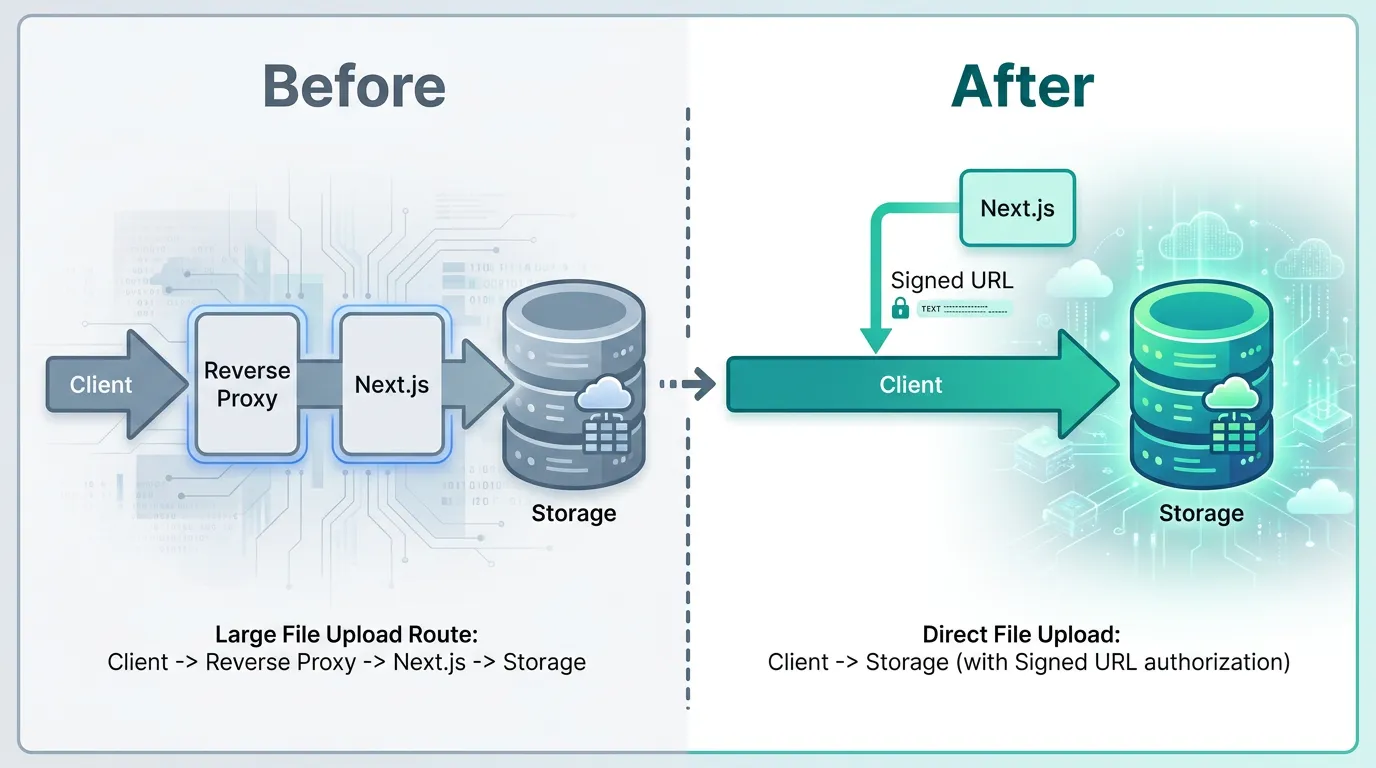
For anything beyond small attachments, the more durable fix is to stop sending the file through your application server at all. Generate a pre-signed upload URL from object storage (S3-compatible storage works well here) and have the client upload directly to storage, with Next.js only issuing the signed URL and recording the resulting object key:
// Route Handler: issue a short-lived signed URL, don't touch the file bytes
export async function POST(req: Request) {
  const { filename, contentType } = await req.json()
  const signedUrl = await getPresignedUploadUrl(filename, contentType)
  return Response.json({ signedUrl })
}
This sidesteps the 413 problem structurally: nginx and Next.js never see the large payload, so there's no body size limit to tune for it.
When this stops being a one-off nginx tweak
A single client_max_body_size line is a reasonable fix for one route. But if you're maintaining the reverse proxy config by hand across multiple environments — staging, production, every new upload-handling route that gets added — the config drifts, and someone eventually finds a 413 in production that was already fixed in staging three deploys ago.
This is one of the places where Kubo changes the shape of the problem rather than the symptom. Instead of hand-maintaining nginx directives per environment, ingress and proxy configuration become part of the same standard Kubernetes manifests you deploy everywhere — no separate proxy config to keep in sync by hand. It's standard Kubernetes underneath, so nothing about how you configure request limits is proprietary to the platform.
Which raises the real question once you're past patching individual routes: is a hand-managed nginx box still the right layer for this, or are you better off running Next.js somewhere that treats infrastructure config as part of the deployment itself? If you're weighing that question, it's worth understanding what you'd actually be replacing — a lot of teams assume "real Kubernetes" means a dedicated platform team, when the operational cost is usually concentrated in exactly this kind of per-environment config drift.
If you're already considering Kubernetes for this
Request body limits are a small, concrete symptom of a bigger pattern: every piece of infrastructure you add by hand — the reverse proxy, the TLS termination, eventually autoscaling under upload traffic spikes — is one more thing to configure consistently across environments. Kubernetes solves this by making infrastructure declarative, but "running Kubernetes" and "running a full K8s cluster yourself" aren't the same commitment.
If you're evaluating what level of Kubernetes actually fits a small team, this comparison of K3s and full Kubernetes is a reasonable next step before you decide how much infrastructure you want to keep maintaining by hand.