
COLUMN
10/11/2026
Rate Limiting a Self-Hosted Next.js App: What Vercel Handled For You
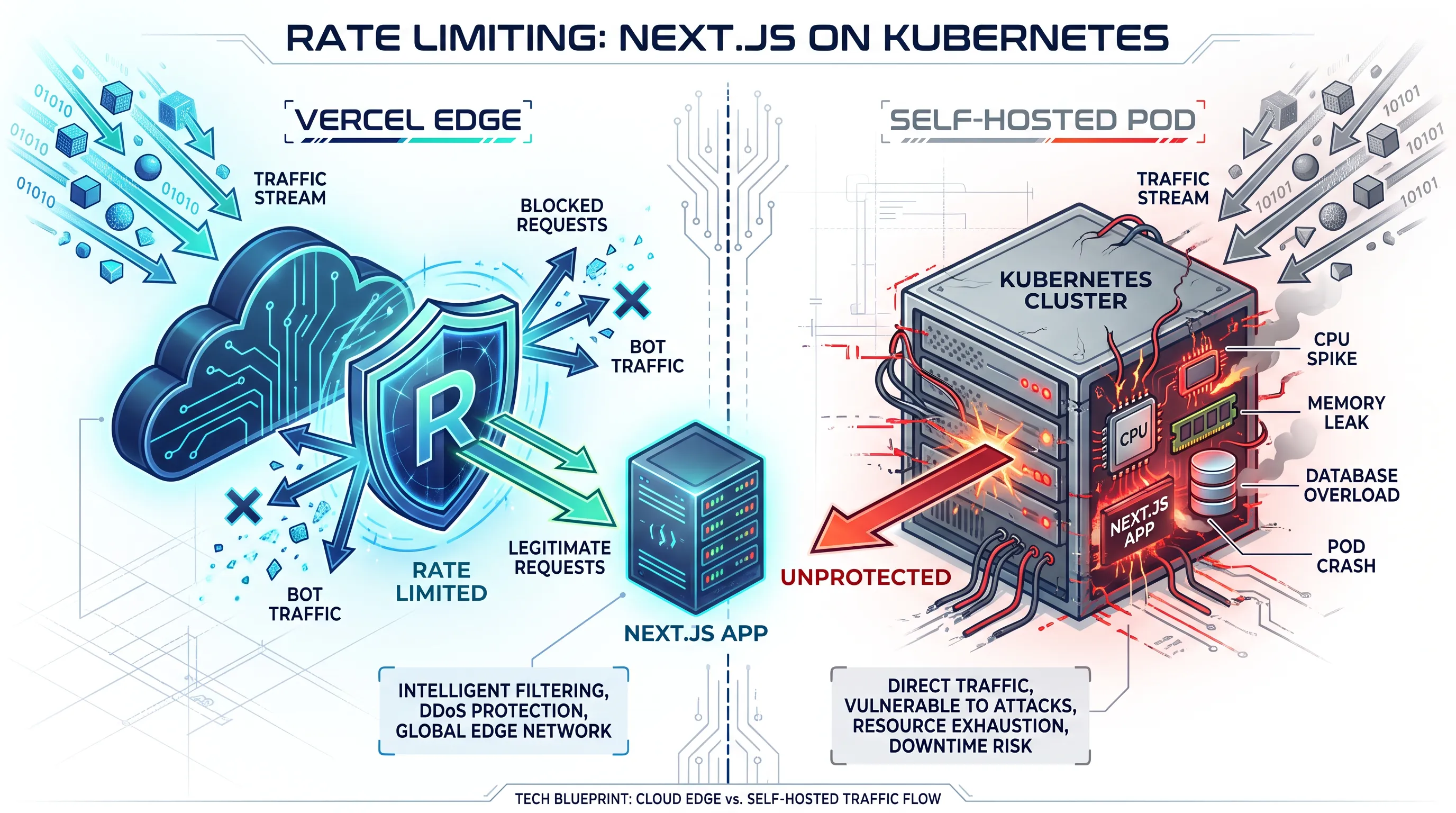
Vercel's edge network quietly absorbs a lot of abuse before it ever reaches your code: it slows down scrapers, throttles brute-force login attempts, and shrugs off the retry storms that a flaky client sends when your API is slow. Move the same Next.js app onto your own Kubernetes cluster, and that protection doesn't come with it — your Pods will happily accept every request a client sends until something runs out of memory or connections.
Why Rate Limiting Disappears When You Self-Host
On Vercel, rate limiting happens in the edge network before a request ever reaches your deployment. It's not something you configure in next.config.js — it's infrastructure you never see, tuned for exactly the kind of traffic Next.js apps get.
When you move to a container on Kubernetes, that layer is gone unless you build it yourself. A kubectl get pods that shows healthy replicas tells you nothing about whether one client is sending 200 requests per second to /api/checkout. The Horizontal Pod Autoscaler will dutifully spin up more replicas to absorb the load, which is useful for real traffic spikes but does nothing to stop a single abusive client — it just makes the abuse more expensive to run.
What Actually Breaks Without It
The failure mode is rarely a dramatic DDoS. It's usually smaller and more avoidable:
- A scraper indexing your product catalog hits every page concurrently, and your database connection pool (already tight after moving off Vercel's managed Postgres integrations) runs out of connections.
- A frontend bug causes a retry loop — a failed
fetchcall retried on every render — and one browser tab generates thousands of requests per minute without any malicious intent. - A bot credential-stuffs your login API route, and each attempt triggers a password hash comparison, which is deliberately slow and expensive to run.
None of these need a sophisticated attacker. They need the absence of a layer that used to exist for free, plus a production app that's now reachable at a stable IP instead of hiding behind Vercel's edge.
Where Rate Limiting Belongs in Your Stack
There isn't one correct place to put it — there are three, and most production setups end up using at least two:
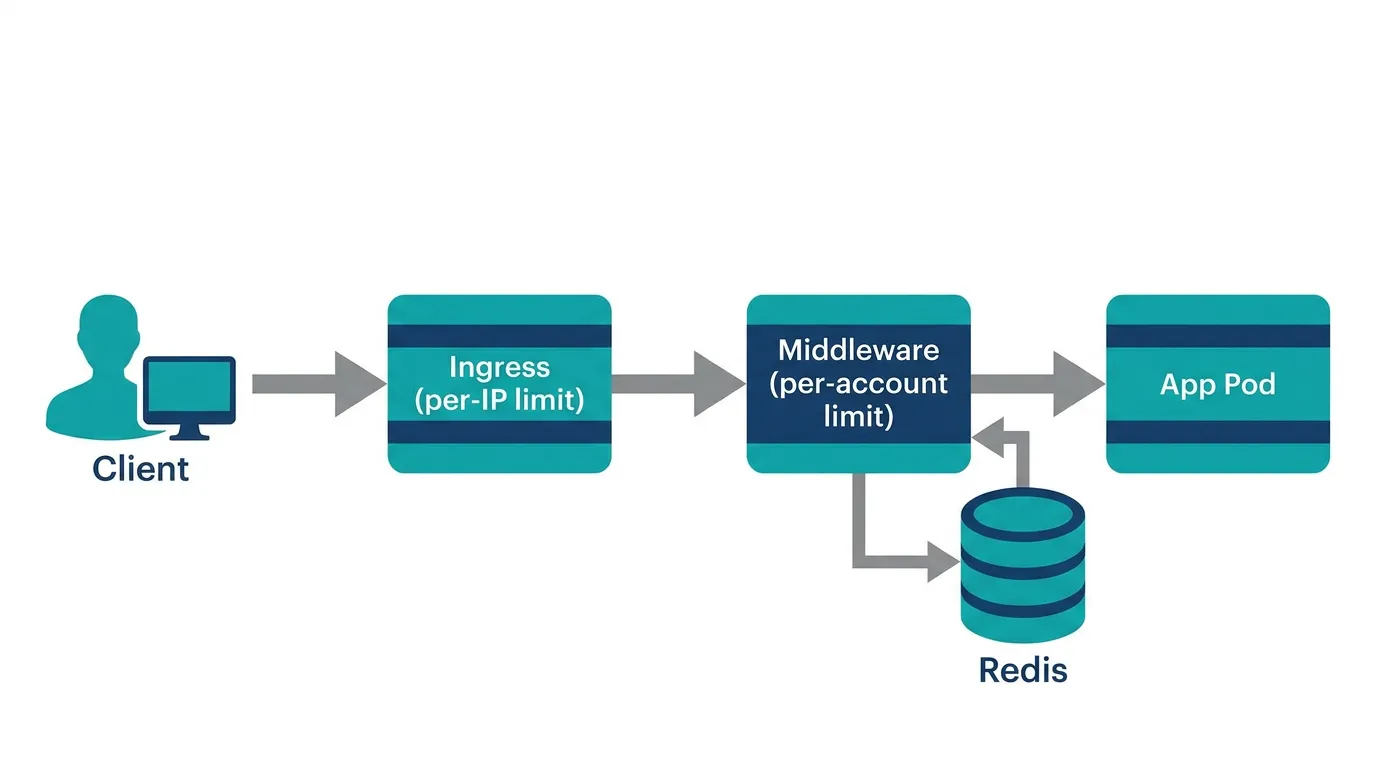
- The ingress layer. Your ingress controller (NGINX Ingress, Traefik, or similar) can cap requests per second per client IP before traffic reaches a Pod at all. This is the cheapest place to stop obvious abuse, because rejected requests never touch your application code.
- Application middleware. Per-route or per-user limits — "five login attempts per minute for this account" — need application context that the ingress layer doesn't have. This has to live in your Next.js middleware or route handlers.
- A shared store. The moment you run more than one replica (which you will, since that's the point of Kubernetes), counting requests in memory stops working. Each Pod would track its own count, and a client could get three times the intended limit just by landing on three different Pods.
A Practical Pattern: Ingress First, Middleware Second
Start at the ingress layer, since it's the lowest effort for the highest payoff. An NGINX Ingress annotation is enough to cap abusive IPs before they reach a Pod:
apiVersion: networking.k8s.io/v1
kind: Ingress
metadata:
  name: nextjs-app
  annotations:
    nginx.ingress.kubernetes.io/limit-rps: "20"
    nginx.ingress.kubernetes.io/limit-burst-multiplier: "3"
spec:
  rules:
    - host: app.example.com
      http:
        paths:
          - path: /
            pathType: Prefix
            backend:
              service:
                name: nextjs-app
                port:
                  number: 3000
This stops the blunt cases — a single IP hammering every route — without any application code. It won't stop a distributed credential-stuffing attempt spread across hundreds of IPs, or enforce "five attempts per account" instead of "per IP." For that, you need middleware with shared state.
Implementing the Per-Account Layer in Next.js Middleware
A sliding-window counter backed by Redis is enough for most apps, and it works the same way whether your middleware runs on the Node.js runtime or the Edge runtime — the only difference self-hosting introduces is that you're now responsible for running that Redis instance yourself, rather than reaching for a managed add-on from Vercel's marketplace.
// middleware.ts
import { NextResponse } from "next/server";
import type { NextRequest } from "next/server";
import { Redis } from "ioredis";

const redis = new Redis(process.env.REDIS_URL!);
const WINDOW_SECONDS = 60;
const MAX_ATTEMPTS = 5;

export async function middleware(req: NextRequest) {
  if (req.nextUrl.pathname !== "/api/login") {
    return NextResponse.next();
  }

  const identifier = req.headers.get("x-forwarded-for") ?? "unknown";
  const key = `ratelimit:login:${identifier}`;
  const count = await redis.incr(key);
  if (count === 1) {
    await redis.expire(key, WINDOW_SECONDS);
  }

  if (count > MAX_ATTEMPTS) {
    return NextResponse.json(
      { error: "Too many attempts. Try again in a minute." },
      { status: 429 }
    );
  }

  return NextResponse.next();
}

export const config = {
  matcher: "/api/login",
};
Kubo runs standard Kubernetes, so patterns like this don't change based on which cluster they land on — a Redis Deployment behind a ClusterIP Service works the same way here as it does on any other managed Kubernetes, which matters if you're moving this app between environments as it grows.
Two details matter for correctness here. First, trust x-forwarded-for only if your ingress controller is configured to set it reliably — otherwise a client can spoof the header and bypass the limit entirely. Second, keep this logic in middleware rather than scattering redis.incr calls across individual route handlers; it's easier to reason about one chokepoint than to audit every API route for whether it remembered to check its own limit.
Monitoring What You're Actually Blocking
A rate limiter that silently rejects requests is a liability if you can't see what it's doing. A legitimate customer hitting a limit because their account was compromised looks identical, in raw logs, to an attacker — the only way to tell them apart is to watch the pattern over time, not a single 429 response.
Exporting a counter for rejected requests, split by route and by which layer rejected them (ingress vs. middleware), turns this from a black box into something you can actually tune. If you're already running Prometheus on your cluster to monitor other workloads, adding a counter metric for rate-limit rejections is a small addition that pays for itself the first time you need to explain a traffic spike or tune a limit that turned out to be too aggressive for real users.
Don't Stop at the Application Layer
Ingress and middleware limits handle traffic volume, but they don't answer a related question: which Pods should even be allowed to talk to your database or your Redis instance in the first place? If an attacker does get a foothold in one compromised Pod, an over-permissive cluster network lets that foothold reach everything else you run. Enforcing which Pods can talk to which services with Kubernetes Network Policies closes that gap — it's a different layer of defense than rate limiting, but the two are usually built at the same time, once a team starts treating "what happens under hostile traffic" as a real production requirement rather than an edge case.
Conclusion
Self-hosting a Next.js app on Kubernetes means rebuilding, deliberately, a layer that Vercel used to provide invisibly. Start with an ingress-level limit, since it's the cheapest to set up and stops the most common abuse. Add per-account middleware limits backed by a shared store once you need finer-grained rules than "per IP." Neither is worth much if you can't see it working, so wire up metrics before you need them, not after an incident. If you're already instrumenting the rest of your cluster, the Prometheus setup for monitoring Kubernetes workloads is the natural place to add these rejection counters alongside everything else you track.